
Weather & Clock Widget Plus
December 10, 2025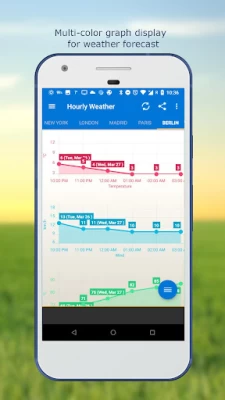
More About Weather & Clock Widget Plus
Features:
- Automatic location detection
- Locate by network and GPS (Global Positioning System).
- Manually search for location by name or zip code.
- Weather notification alerts.
- Multiple weather providers.
- Current weather condition.
- Hourly weather forecast.
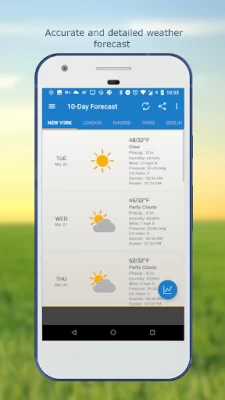
- 10-day weather forecast.
- Temperature.
- Celsius and Fahrenheit temperature unit.
- Relative humidity percentage.
- Atmospheric pressure.
- Visibility distance.
- Precipitation.
- UV-Index.
- Dew point.
- Wind speed and direction with different units.
- Sunrise and Sunset times.
- Display temperature in status bar (Notification bar).
- Share weather and location information with friends.
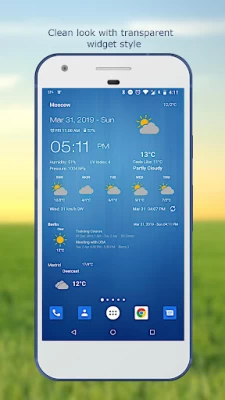
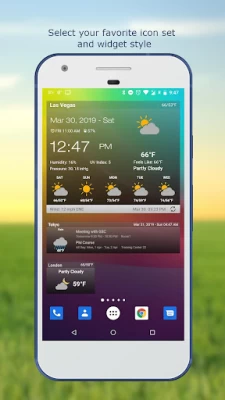
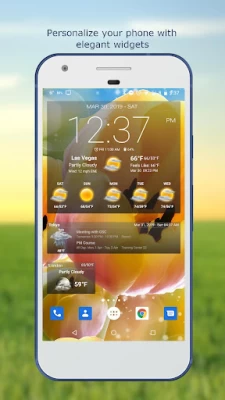
- Elegant home screen widgets.
- Customize font for clock and date.
- Moon phase.
- Update on WiFi only and stop while roaming.
- Automatic update intervals: 15, 30 min, 1, 3, 6, 9, 12 hours or Manual update.
- Follow weather and forecast for multiple locations.
- Weather map.
- Android Wear support.
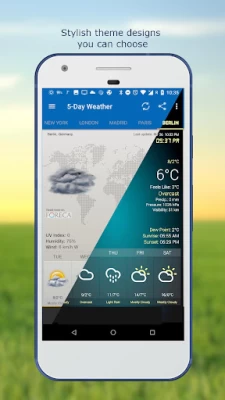
- Themes.
- Chart graphs.
- Localized to many world languages.
FAQ page: http://devexpert.net/weather/FAQ
For more information: http://devexpert.net/weather/
Like us on Facebook: https://www.facebook.com/Weather-Clock-Widget-182414791859010/
Latest Version
4.5.3.7
December 10, 2025
Interactive Saudi Arabia
Tools
Android
189,458
$7.99
com.devexpert.weatheradfree
Report a Problem
User Reviews

A Google user
6 years ago
This ap will not update even though I have indicated in the settings to update automatically. I continue to have to go into settings and update manually. It does not detect my location although I have the GPS setting on. The clock portion gets stuck at times as well. Not very convenient having to refresh it to get the correct weather and time.

MarcS Black
1 year ago
03/2024: The pro, ad -free version has a large print style widget that is excellent for the first page of your phone. The weather and satellite location are quite accurate. All 5+ of my weather & severe- warning apps are ad-free. Thank you! Missionary's choice! € Earlier bugs seem to have been fixed. Displays the name of easily 5 global cities 😊 .
A Google user
6 years ago
This App fails to update the weather on my Samsung Galaxy. I don't know why this is happening because I viewed all the settings in the App and selected to have it refresh in intervals of 15 minutes. Also my Location is turned on, and yet the App is not refreshing - Its frustrating that I have to manually update the weather, the time and the location. Shouldn't it automatically detect where I am and refresh when I open my phone? THIS SUCKS!!!!!!

Larry Banamassa
3 years ago
Since updating my phone to Android 12 the clock, calendar, and weather doesn't update unless you do it manually every time you unlock your phone. APP NEEDS AN UPDATE! Says it's going to rain Wednesday, Saturday, and Sunday when every other weather service says zero chance of precipitation Maybe it's time to hire a new development team? Will not update no matter what weather service is used! Still inaccurate weather conditions Have to manually update. It's still not fixed!
A Google user
6 years ago
I have tried several weather apps. This one seems to be the best. This one includes widgets I can place on my home page; so I can glance at the current temperature without opening the app. It also allows a choice between two weather providers. Just about everything on the app is customizable, including the data displayed on the widget. On ny new phone, I purchased the ad-free version. I do not use the location feature; I manually set my location; so I cannot comment on that.

David K
2 years ago
Advertising too intrusive, and do not like subscriptions. Should have option to buy. Also stop asking 'turn on" rain or snow notifications, once user says no, don't keep asking. How about add more color to weather icons and improve the widgets. I use a different weather app for my widget.
A Google user
6 years ago
Totally worth buying! I mainly use the large widget on my home screen, which shows not only the weather, but also the time, alarms, battery, & location. Touch the time to quick-start the timer app. Integrates current temperature into the status bar, as well as even more into the notification drawer and lock screen. Confirmed working on my Galaxy S7 Exynos/Oreo, Moto G5 Snapdragon/Oreo, Siswoo C55 MediaTek/Lollipop. No worries!

Arcadius K
3 years ago
One of the nicest looking weather apps with many widget variations currently available in Google Play Store. My rating is a solid 4*, ok 4.5*. Sometimes the location animation glitches on the home screen like a Dj's record. I wish I could have more control over the theme (color, opaqueness, etc.). Overall, couldn't be more happy.

Junken 純絹 Misters
4 months ago
It's a decent app, but there are many bugs. Weather will not stay on the first or last used city... I have to reorganize them tonshow the correct place. There is nonway to pin a city, or to better customize things. It's fine if you just have one city, and is reasonably accurate. Some bug correction and more customization and accuract would be a benefit.

Greg Crnkovich
4 years ago
I've used it for three years across 4 platforms and loved it, Never fails, :-). It is slow to update locations after flights, though.. The workaround I found is to go to Google Maps and update my location. Then the widget updates quickly. Otherwise it may take several minutes to update automatically.

Predrag Bubalo
1 year ago
Totally unreliable! There are no updates, only limited to 2 weather providers. Weather does not automatically update, can be off by 10 degrees! Very limited widgets and icon settings. Clock is VERY SLOW to update!! The time can be off by an hour. Also very limited fonts, background options and colours options. Edit: after a year nearly nothing has changed

Robert H (simataas)
2 months ago
I've been using this robust weather app for many years. So many options - love it! Also works with Nova Launcher. Highly recommended.
A Google user
6 years ago
Firstly, I found this while searching for an app that would push weather information to my smartwatch, in fairness it doesn't say that it does, and it doesn't. I bought it, and then found this out within a few minutes, so I uninstalled, as it's not what I wanted. Maybe my error in even trying. Secondly - despite the fast uninstall, there is no sign of my refund. 😕

Ian Ford
1 week ago
easy to use and read, ads are well placed and relevant. I found the information to be as accurate as any other service, and I like the widget.

E. G.
2 years ago
The most beautiful and useful widgets. But, weather conditions and forecasts themselves are not really reliable most of the time. Please find a better weather provider... UPDATE: Thanks for fixing the issue with selecting an app to open when tapping on the widget. However, recently the app often shows weather for a wrong location despite precise location permission granted at all times. I'm starting to search for a more reliable app.
A Google user
5 years ago
I liked it better when it was a widget that I could see open all the time on my home screen. And there's a really irritating number 1 notification alert signal that has shown up on the app shortcut that won't go away. It doesn't give me any indication what it's referring to and I can't get it to go away! Really irritating everytime I look at the shortcut!
A Google user
6 years ago
For some reason the app always defaults to Sacramento. I wish there were a way to default to a preferred location or the GPS detected location on the widget. It's pointless to have the widget defaulting to the weather in a location 600 miles away. I have to click on the widget icon to open the app then select the location to see my local weather. I can't find a setting to change this and I'd love to just see it at a glance on the widget.

Rebecca Fouts
2 years ago
I used this app for years. I love how many options the widget had. But the format of the actual weather data within the app I find confusing compared to most others. I'm not a fan at all of its weather tracking graph display. Other apps have a much easier to read way to display the changes over time. I was using this apps widget for my clock & weather display on my home screen, then using a small weather bug widget to access looking at more in depth weather forecast info.

Ville Walveranta
2 years ago
Works well. But I still wish there was an easier way to switch between Celsius and Fahrenheit! Such as by tapping on the temperature. That's the only feature I (and probably most people who live in the U.S., but who didn't grow up here) miss in this app. Still liking the app six years later. Still wishing an easier way to switch between C/F. 🙂
A Google user
6 years ago
I've been a user and a fan of this widget for the longest time, due to its ability to show hourly weather right in the main screen, besides being highly configurable. Recently it gained the ability to show longer intervals (3h), which allows me a quick glance of what I can expect for the whole day. That was the only feature I was missing, and I got it in the free version! I'm more than happy to pay for the premium version of the app.









