Truebot ColorCard
December 06, 2025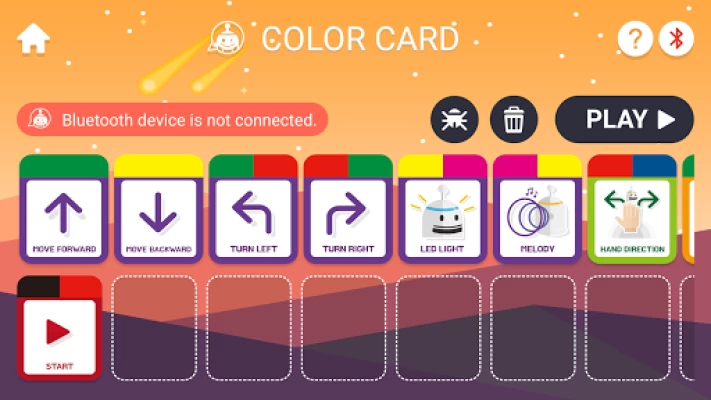

More About Truebot ColorCard
TRUEBOT Coding Card is an app that remotely controls TRUETRUE, the smartest coding education robot.
TRUETRUE, optimized for Software education, helps children understand and organize the basic principles of coding easily and interestingly. They can improve creative and logical thinking by combining coding cards and checking the movement of the robot.
How to use:
① Launch the app and choose the Bluetooth icon on the top right corner of the screen
② Turn on the robot and choose the robot’s name on the screen. In general, it is provided in the type of “TRUETRUE + ABCD” (ABCD is an example for better explanation. Therefore, it will differ.)
③ After choosing the robot, the name will be shown on the top left of the controller.
④ Tap card and drag it to the lower part of the screen (It becomes commands). After you put and create commands, press ‘Play’ button on the top right corner and observe how your robot is moving.
⑤ If you put wrong commands, you can cancel them by tapping ‘x’ on the top right corner of the card.
⑥ If you want to delete all commands at once, select ‘trash can’ on the top right corner of the screen.
Main Features:
Line tracing: It can follow colored lines on the paper or floor.
Basic movements: You can control robots with coding cards such as ‘go forward’, ‘turn left (or right)’
Grid: It can recognize go board-shaped grid drawn on the floor.
Loop: It can repeat specific commands you want.
* Required permissions: Location information (for searching Bluetooth-capable devices)
How to use:
① Launch the app and choose the Bluetooth icon on the top right corner of the screen
② Turn on the robot and choose the robot’s name on the screen. In general, it is provided in the type of “TRUETRUE + ABCD” (ABCD is an example for better explanation. Therefore, it will differ.)
③ After choosing the robot, the name will be shown on the top left of the controller.
④ Tap card and drag it to the lower part of the screen (It becomes commands). After you put and create commands, press ‘Play’ button on the top right corner and observe how your robot is moving.
⑤ If you put wrong commands, you can cancel them by tapping ‘x’ on the top right corner of the card.
⑥ If you want to delete all commands at once, select ‘trash can’ on the top right corner of the screen.
Main Features:
Line tracing: It can follow colored lines on the paper or floor.
Basic movements: You can control robots with coding cards such as ‘go forward’, ‘turn left (or right)’
Grid: It can recognize go board-shaped grid drawn on the floor.
Loop: It can repeat specific commands you want.
* Required permissions: Location information (for searching Bluetooth-capable devices)
Latest Version
Version
1.2.56
1.2.56
Update
December 06, 2025
December 06, 2025
Developer
i-Scream Media
i-Scream Media
Apps
Education
Education
Platforms
Android
Android
Downloads
21,710
21,710
License
Free
Free
Package Name
kr.co.sigongmedia.truebotcolorcard
kr.co.sigongmedia.truebotcolorcard
Report
Report a Problem
Report a Problem
Add Comment & Review









