TomTom MyDrive™
June 16, 2024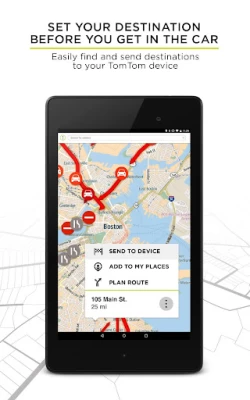
More About TomTom MyDrive™
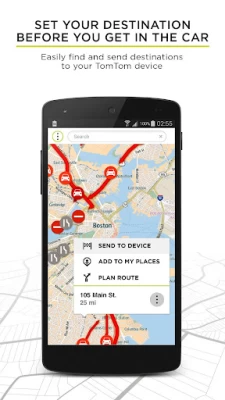
>> Set your destination and sync it with your TomTom GPS navigation.
>> Set where you're going using phone contacts, saved favourites, a tap on the map, or just type it in. Then send it to your TomTom GPS navigation and it will guide you through traffic.
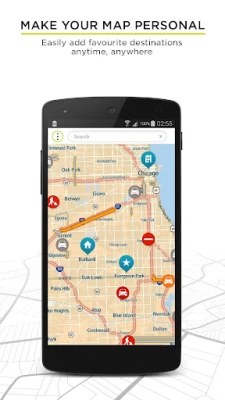
>> Make your map personal: Easily add and manage your home, work and other favourite destinations.
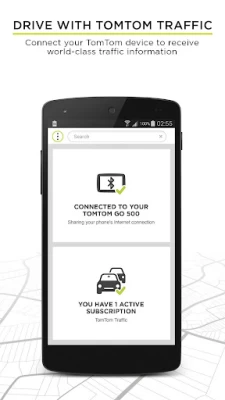
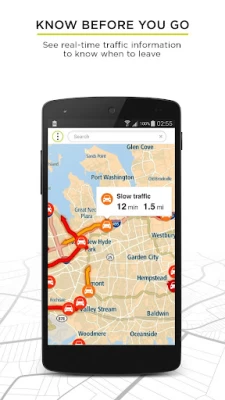
>> Know before you go: We're passionate about traffic so you don't need to be. Get highly accurate traffic information, in real-time.
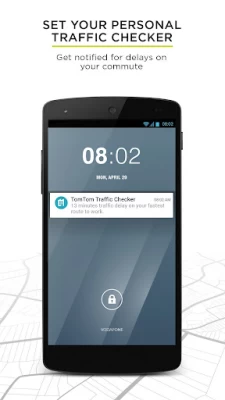
>> Set your personal traffic checker: Want to know about traffic on your commute? Get reports before you go in case of delays on the way.
GOOD TO KNOW:
-You can get TomTom's world-class, turn-by-turn navigation by downloading our navigation app: tomtom.com/en_us/navigation/mobile-apps/go-navigation-app/
-Your TomTom navigation product needs to be connected to the Internet to exchange information with the MyDrive app.
-Note : This app does not provide turn-by-turn navigation.
Latest Version
2.20.0
June 16, 2024
TomTom International BV
Travel & Local
Android
195,776
Free
com.tomtom.mydrive
Report a Problem
User Reviews

A Google user
7 years ago
Update I am at my wit's end with this unit , customer service is very good resetting it has continually temporarily fixed it however , the traffic update function is intermittent at best and that's giving it a lot of credit , I should not have to perpetually reset it to factory settings in order to get it to temporarily work . The unit itself works fine, however out of the box can't connect via this app through Wi-Fi always unavailable try later, computer can't get past splash screen , 5 hours today playing with this, it's two days old

Anthony Berlingieri
3 years ago
Only wanted to connect to the phone for the traffic updates. I DO NOT want to have my GPS access phone and text. Thats what my phone is for. But the app must in order to even link. So I tried it. The unit will not connect("cannot connect to phone" in the unit's BT menu) to my phone for traffic. Using a Tom Tom 520. Both app and device mention a lengthy step connection process. Would much rather go back to the old radio receiver inline with the USB plug than this hassle. Uninstalled.

Bill Easterday
3 years ago
UPDATE July 2022. They seem to have the Bluetooth and/or WiFi issues fixed. It sure is handy to add Places in the app while sitting in the La-Z-Boy have them automatically populate the GPS. - Although my Samsung Galaxy A50 phone thinks it is linked to our TomTom Go Supreme the GPS doesn't think so. Tried repeatedly to link via Bluetooth with the same results. This precludes getting any traffic updates. Traffic worked much better on older TomTom Start with radio receiver in the power cord.
A Google user
6 years ago
Performs perfect with one exception, Samsung is a horrible platform for this app. My Samsung will not pair, even after being sent back to Samsung for analysis, still can't pair with my TomTom Go 60. My old Samsung 6s will pair with the same TomTom from any location, data off, data on, wifi on and the S6 "will pair". My new, refurbished, overhauled, whatever you want to call it, refuses to pair with not only the TomTom, but three other devices I have. I have lost all confidence in Samsung phone's

Randolph Horvath (None)
3 years ago
One star because it does not work in the United States. Also, the day trips to drive are 90% in Europe, 16 hours flight time from me. The website never said anything to me about this, and I paid over $150.00 US for the Go Supreme and my old TomTom 350XL from 2010 has more features, it just can not get an update. The app is great if you live in Europe or nearby. I live on the other side of the Atlantic. So, I deleted this from my phone.

RimeOne
4 years ago
My device will be connected to my phone via Bluetooth and still say not connected at the same time. For instance I don't get traffic data and I can't send locations from my phone to my GPS unit but if I go into settings and click on bluetooth it says that my GPS unit is connected to my phone and my phone has data at that time. Soooo, how about you fix this please.

Jay Frank
4 years ago
It's great when it will connect to your GPS device. Once you leave your vehicle and come back, then your phone and gps won't connect again without shutting down the gps and turning it back on. Extremely frustrating! Would be 5 stars if I didn't have to constantly try to get my devices to communicate. It's not my phone either, phone connects to every other device I have just fine. It's the "GO Supreme Tom Tom" device that's the real problem.
A Google user
6 years ago
Very frustrating having to take time installing and deleting the app for it to work only half the time! As a car hauler I'm not able to take some routes and this app will take the long way to a short path tom tom trucker 620 with all the settings set for trucking! If you lose signal you will be deleting and downloading the app and most of the time it wont acknowledge the pairing! If I could give a minus stars I would!

Stephen Platt
4 years ago
I downloaded the Android app a few days ago; ended up deleting it because it wouldn't start for some reason. Device is Onn tablet running Android 10. That being said, I will say that the Tom Tom My Drive PC version is great; I award that 4 stars! I use that with a Trucker 620. I'm able to send new destinations and create My Route files to destinations and send from my laptop to the Trucker 620. I have connected the Trucker 620 via wifi hotspot function on my Blackberry Classic phone for traffic updates. I still use that connection when in my car; now in my truck it is connected to the truck e-logger system via wifi. Works flawlessly. Of course, the phone functions of the 620 isn't available via wifi; the road noise in my truck is so loud I don't think bluetooth functions would work well at all. Reading the many reviews commenting on constant loss of bluetooth connection and batteries draining I may be glad the Android version is apparently not compatible with the Onn tablet. I know it may not be the most convenient for most people; I'd highly recommend trying the PC version for your Tom Tom as well as activating the hotspot function on your phone and connecting the GPS to your phone that way. I don't think you'd be disappointed!

Timothy O'Grady
3 years ago
This app always has problems connecting to my device. It can connect to send notifications but won't send traffic. It seems that if an app is how you want to connect to make your product work that you actually put time and effort into it working. Multiple times, I have to force stop it and shut down my TomTom just to get these to connect to each other. It had been like that since I got it.
A Google user
6 years ago
Cannot turn app off in the app itself! If your are not near your vehicle it will constantly try to search to connect to tomtom and drain your battery like mad! Unless you are going on a really long trip and need the traffic update do not install!!!!!! Cameron you simply cannot close the app from within itself! You have to go into phone settings and search through the apps until you find "my drive" then force stop! This is stupid! In older version of my drive you could turn it off. Developer issue

Sam Sig
2 years ago
Glitches.Good.Then Not. When I first bought and connected to phone, while driving could get text read to me, announcements of who's calling, etc. Now, I have to re- connect(pair) device every other time to be sure to get text msgs read. With last update, no read text msgs., no notice, badly able to use phone(calls). Have checked to be sure phone is still in connected lists of Bluetooth. Updated are supposed to enhance, not detract.

Kman
3 years ago
Update: giving one more star since the solution provided by TomTom works but is not ideal. You have to turn on your Wi-Fi hotspot which often loses connection and drains more battery than Bluetooth. You can't pair your TomTom device to your phone without using their MyDrive app. You can't get traffic data unless your device is paired to your phone. I don't have a problem with pairing TomTom to my phone but the app is a huge battery killer. It drains your battery even when you're not using it.
A Google user
6 years ago
Glitchy. Disappointing. Need to improve the reliability of this app. Good when it works. Multiple times it just loses all of my places, and loses the ability to send a destination to the GPS. The only way I've found to fix is to uninstall/reinstall. Also, not sure when it's actually connected and sending traffic data to the GPS. When everything is working properly, the TomTom system does a good job of avoiding traffic. Need to make it more reliable. 15Mar2019,20Mar2019 Uninstall/Reinstall

Andrew Shaw
5 years ago
Used to work well. After last update the app will no longer send destinations to my TomTom wifi 620. It was the best feature of the app. I used to be able to use this easier than my TomTom device. Seems that they did not remove the feature so much as there is now a bug because it still gives the option to send a destination, but nothing happens when you choose to.
A Google user
7 years ago
It worked fine until the recent update. Now my Tomtom GO 500 can't pair with my Samsung J3. It did for years. Of matter of fact, it can't even find it when scanning for Bluetooth devices. My phone can't find the GPS either. Both were still listed in the pairing menu. I deleted them and did a seach and nothing to or from either device can be seen. I've tried all the methods and double checked data enabled and that the Bluetooth is on. I even did a factory reset and updated the GPS. Nothing, nada, ziltch. Oh yes, my phone "sees" other devices just fine What the heck did you guys do??? I'm really ticked off! I drive out side of urban ares mostly and this system is tops. Switching for traffic matters in only urban ares is useless
A Google user
6 years ago
Keeps crashing since last update. Need to add highlights or markings for designated scenic routes and an option to opt for them as well as opting for coastal routes, when they are nearby or coincide with your general route. Plotting a scenic or coastal route should not be THIS difficult. I have uninstalled and reinstalled 3x and cannot get the app to work. This GPS (TT Rider 550) is almost worthless without the app.

Dave the Nightcrawler
5 years ago
Having same issue as most reviews. GPS and phone (Galaxy S8) are paired and connected. Can answer and make calls through the GPS. I can have my text messages read aloud. If I plan my route through My drive, it will not send to the GPS... even when clicking on send to device. Also, trips already made do not show on MyDrive under recent trips. Am not receiving any traffic updates etc... Just very disappointed in the Tomtom MyDrive app. No exit button on the app and it doesn't work properly.
A Google user
7 years ago
The app has a very invasive operation causing you to have to force close it all the time. When you turn on your phone it automatically starts asking you to connect, to close you have to force close because there is no actual way within the app to properly exit and close it. After you're done using your Tom Tom on your trip, same thing, has to be force closed to exit it. The reason for this is because otherwise you get this annoying constant notification to connect to your Tom Tom. Theoretically you could just hide notifications from the app but I question doing that because then I feel it would be running in the background constantly without you knowing it. It really needs an exit and close option, it's a terrible oversight and an easy thing to resolve.

Harry Thompson
1 year ago
Update, it's been a year since I bought the TomTom and tried this app and gave up. I figured I would see if it has been improved and make my purchases worth while. No such luck immediately after installation the app force closed. Then after reinstalling it I can not scan the QR code on my device. I reinstalled it several times and no luck. Wish I had returned my tomtom last year!









