

Tab - The simple bill splitter
August 15, 2024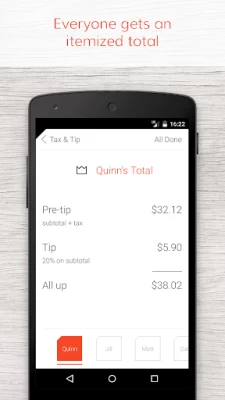
More About Tab - The simple bill splitter
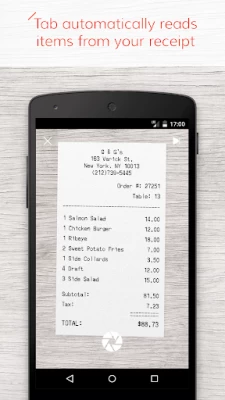
• Take a picture of your receipt to read in all the items and prices from the check
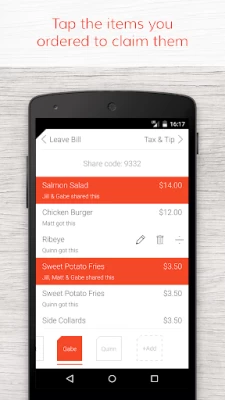
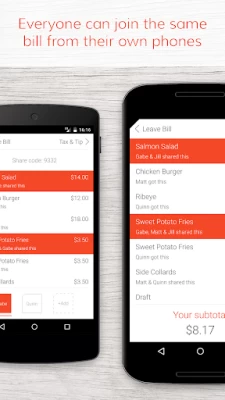
• Select which items each person ordered. Everyone with Tab on their phone can join onto the bill and select their own items – Tab keeps everything synced in real time.
• Multiple people can select the same item if they shared it
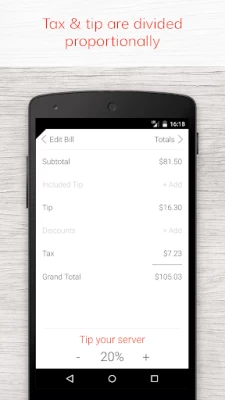
• Tax and tip are automatically divided proportionally
• If it's someone's birthday, you can split their total evenly among everyone else
• Settle up within your group using integrated Venmo or by recording a cash payment
Never struggle to split the check again!
A note to our international friends: Tab is currently only available in the US Play Store because the many different receipt formats, unique taxes and languages in other countries would cause our image-to-text conversion and parsing to give very mixed results. We hope to bring Tab to other countries as soon as we can. Thanks for your patience!
Latest Version
3.0.0
August 15, 2024
bring10, LLC
Travel & Local
Android
109,650
Free
com.bring10.tab
Report a Problem
User Reviews

Duranvolt
1 year ago
Real hit or miss. When it works it's great! Easy to assign items and very convenient. Sadly, half the time it refuses to process the receipt properly.

Scott Lerner
1 year ago
Used the app for the first time at dinner last night. Overall it worked great, needed to learn a few nuances to simplify the experience, but it was intuitive. I would give it five stars except we got a digital receipt today and there's no upload option. Is that's added, five stars for sure.

Kim Schilling
4 years ago
This is a solid app, been using for years! But it would REALLY be great if I could upload a screenshot for when I use waitr. And if I could name the receipts that would be so much easier to keep track of. Finally if I could duplicate items as easily as I can divide them, this would very easily be 5 star app.

A Google user
6 years ago
fast and simple uneven and even distribution of bills. just looking for something to does the math for me when people didn't get the same things. used it only in party with friends when someone brings chips, the other one beer, someone goes to the grocery store. didn't use the camera feature yet. but good and simple app. perfect for my uses

Andrew Baker
2 years ago
Almost great but for some odd reason it won't let you put in a tip amount, only a percentage, and it calculates the tip on the before tax total. I have never seen a single point-of-sale device that does math this way. Anyway, we had a table of 8 with a lot of sharing so it was a bit disappointing to use the app to properly apportion everything and then find the math didn't work out.
A Google user
7 years ago
This app has so many hugs and missing features. Why can't I upload a picture of my check from my photos? Why is it so unintuitive how to edit items? Why do the items and people my bill duplicate when I want to look back at my bill the next day? Now I have to re-enter everything including taking a new picture since I can't upload something. I'd prefer to use plates by spitwise but I don't have an iPhone.

Izzy
2 years ago
Whenever I'm out with a group I do always use this app. But I wished it I could upload a photo for the receiept and if I took the photo of the receipt in the app it would save the picture (not always having the flash on would be nice too). Also having the ability to just say how much the tip was instead of the app only doing it by percentages would be nice too.

Minna Ho
2 years ago
The app makes splitting bills much easier. No more excel sheets with complicated calculations! The only thing I wish could be changed is inputting the tip as a number instead of a percent. Sometimes, we will tip a flat number that can't be added to the app as a percent exactly, so the calculation becomes off. Please add this feature!
A Google user
5 years ago
Some great features but overall it didn't work. I uninstalled it. Did a great job on: - identifying items in the bill from a photo. - picking people to share the bill Needs improvement: - dificult to split items via "Shares". You have to divide the item into as many pieces as there are "Shares" then assign multiple pieces to each person to get the total. Needs a method to say Dick gets 5 shares and Jane gets 2, for instance - Didn't recognize tax and tip entries from the bill. They had to be entered manually. - only allows tax and tips to be split proportional to each person's subtotal. - Automatically added a tip of 18% even though I was splitting a grocery bill. The display didn't fit on my screen so the tip percentage menu wasn't accessible. I had no way to change the percentage or turn off the tip altogether. All-in-all a good first try, but this app needs work before I can use it.

Naya S
2 years ago
Fantastic tool! So simple to use, very convenient features like splitting a dish and splitting someone's meal to everyone because it's their birthday. One thing to make it perfect, I suggest letting me tap on someone's pre-tip total and see the breakdowns of what their total is, what their tax is, and what their portion of the tip is. Awesome app!

Shaan
3 years ago
Useful app. Good design Some issues: *using camera unnecessary while on the home screen menu * needs ability to load a receipt image from the camera roll * when typing in the item name, the text field is configured to now allow you to use autocorrect on your keyboard * venmo integration is broken * there is no way to enter a custom amount for the tip * would be great if you could enter your local tax rate in settings so you don't have to enter it every time

Gena Tools
3 years ago
Very simple and discrete. Discrete as in unlike 99% of other split apps, this one does not require you to put in any personal information at all, no email, no numbers, not access to your contact list. That's already a good sign. One thing I would like to add is that I had a frustrating moment where I tried tapping on my name when making the bill to add another item after adding another person but it didn't work. Turns out you need to drag the bottom of the screen to change people.

Catherine Chaney
2 years ago
This is such a helpful app. It genuinely makes splitting a group bill easy. I really like that you can divide shared dishes and cover someone's bill for their birthday. It'd be great if there was a way to view everyone's items from the ending "Total" screen instead of flipping back to the beginning - maybe we'll get that update in the future? All in all, this app is excellent.

projectzigma
2 years ago
It's almost a great app. There needs to be a quantities input when you select items to add to your personal bill. Otherwise, on items with multiples, you have to wait for everyone to select all the quantities, or it forces you to split the cost of the remaining quantities. It's kind of annoying! Another thing, the venmo linking doesn't always work. 3 stars because the receipt picture capture is pretty solid.

Erick Barrientos
3 years ago
Great app! Love that there is a birthday feature because I used the app forgetting that we weren't paying for our friend's bill. One thing that would be nice to have would be an "undo" for the divide feature. I accidentally kept splitting somethings up that weren't supposed to be split up. In order to restore it, I had to delete the splits and edit the original price to the item. It's no big deal but it would be a nice to have, not so much a need. Other than that it makes things simple!
A Google user
7 years ago
This is exactly what I was looking for. Only thing I wish the app could do is retrieve your friends list from Venmo so that you can easily request money from your Venmo friends who don't have the app. I like the idea of others being able to join a bill of they have the app, but if you're in a group of 12+ people and some of them might be drunk, it's a little too much to ask them to download the app, join the bill, and pay me that way; whereas if I spent 5 minutes allocating the transactions myself and requested people a certain amount of money, they could just click "accept" on the Venmo notification on their phone. Other than that, the app is great (image recognition works a lot better than I expected it to) and it definitely has the potential to be even better.

Ashford Morrocco
5 years ago
Opens my camera in the background of the main screen which is incredibly distracting. Linking to venmo requires giving up your actual username and password. (Might be venmo not having api?) I was unable to join a bill that someone pre-split because my name was already taken. We are trying to split up grocery bills where the name of the item is unclear once the app scans it in. Too many frustrations for me to use, sorry.

Paola J
2 years ago
I like it but there was a couple mistakes that if avoided this app would be amazing.... I took a picture of the receipt and it didn't add the edamame for some reason I took 3 pictures and never included that charge $8) so the total was wrong...also in CA they charge a 3% surcharge and it wanted 1 person To pay for it as opposed to splitting! ALSO it automatically charges an 18% tip to each person which I don't agree with! Let me tip what I want to tip don't tell me what to do with my money!

Tyler Knight
1 year ago
Really great app compared to the competition but needs improvements: - Totals should all be shown on the same screen so that it can easily be shown to friends (like the Plates app on iPhone). - When choosing what items go to who, some color difference or grouping would make it much easier to make sure you set everything up properly. - Names and order history shouldn't be so limited. - The UI is very boring.

Jessica Rivas
1 year ago
**Edit, losing one star because I got several friends to get tab and imagine my surprise when I'm discover that the apple version has the features everyone asks for in reviews! They can use screenshots, and see the individual breakdown I love being able to get everything split up easily after dinner. The only thing I wish it had was the ability to upload from a screenshot like the apple app and a screen that showed everyone's break down in one page so I could send that to everyone on the group









