

Solo - Fretboard Visualization
December 19, 2025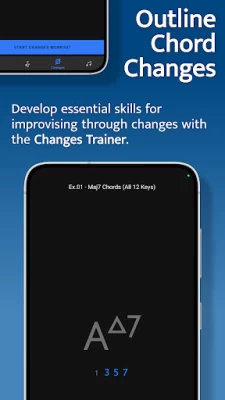
More About Solo - Fretboard Visualization
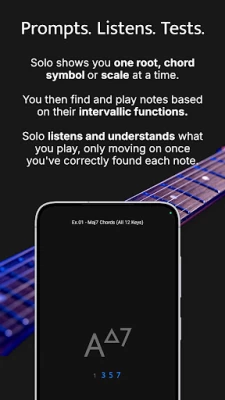
Solo asks you to find intervallic functions against one root note, chord symbol or scale at a time, listens to the notes you play, and doesn’t move on until you’ve correctly found each note by its intervallic function in the specified order.
Practice with Solo and finally learn your note names, master interval shapes, confidently play through chord changes and break out of scale boxes with intervallic functions. Start transforming your playing and confidence on the fretboard today!
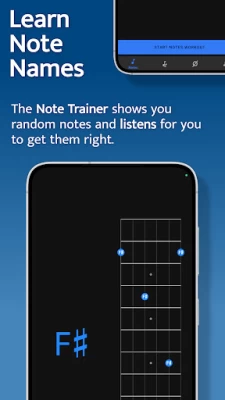
NOTE TRAINER
The Note Trainer is perfect for beginner and intermediate players getting to grips with note names on the neck - the foundation of solid fretboard knowledge.
‣ Solo shows you random root notes to find and listens, waiting for you to get it correct.
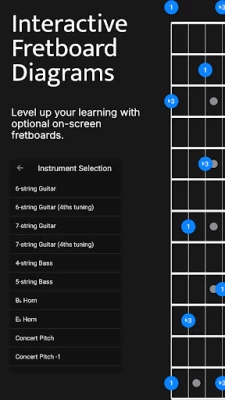
‣ Slide on the interactive fretboards for helpful diagrams and to study alternative options. Choose from 6 string guitar (standard and 4ths tuning), 7 string guitar, 4 string bass & 5 string bass.
‣ Optional practice suggestions offer challenging ways to limit and test yourself.
‣ Duration based workouts allow you to craft the perfect practice session.
INTERVAL TRAINER
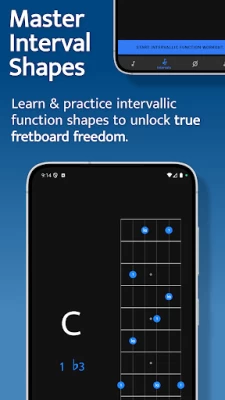
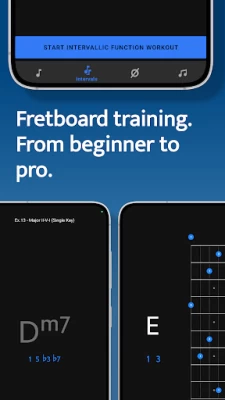
The Interval Trainer will help players at all levels work on interval shapes with intervallic functions - the key to unlocking true freedom on the fretboard.
‣ Choose any combination of intervallic functions to practice.
‣ Create custom interval groups or choose the intervals for ANY chord type or scale.
‣ The Interval Trainer will randomise your chosen intervals and ask you to find them against either a fixed or random root note.
‣ Slide on the interactive fretboards for helpful diagrams, showing you where all of the interval shapes are across the neck, and to study alternative options. Choose from 6 string guitar (standard and 4ths tuning), 7 string guitar, 4 string bass & 5 string bass.
‣ Duration based workouts allow you to craft the perfect practice session.
CHANGES TRAINER
In the Changes Trainer you find intervallic functions, using single notes to outline different chord types or sets of chord changes, a key skill for learning to improvise through chord changes.
‣ Practice outlining intervallic functions through over 100 common chord progressions and single chord exercises.
‣ 50 intervallic function levels. Go from simple chord tones to complex melodic structures and scales.
‣ Solo intelligently maps out the correct intervals over each chord and listens for you to play each intervallic function in the specified order.
‣ Powerful workout options provide almost limitless ways to challenge yourself.
‣ Transpose the key of any progression or exercise.
‣ Choose to randomly transpose the progression (or single chord exercise) each time it repeats.
‣ Work on voice leading chord tones through single note lines.
SCALE TRAINER
The Scale Trainer contains a vast array of scales and powerful workout options, allowing you to finally break out of the box and develop a much deeper understanding of how scales are constructed on the fretboard.
‣ Practice finding scales on the fretboard using intervallic functions.
‣ Over 50+ Scales and modes.
‣ Powerful workout options provide almost limitless ways to challenge yourself.
‣ Melodic sequence options let you focus on starting from any chord tone within the scale.
‣ Duration based workouts allow you to craft the perfect practice session.
Latest Version
2.0.8
December 19, 2025
Trio Software Ltd
Entertainment
Android
9,383
$14.99
app.solotrainer.solo
Report a Problem
User Reviews

Chandler Lorenzo
2 years ago
Absolutely the best app I have ever seen for developing fretboard fluency, if not the best practice tool in general I have ever used. The whole concept of using intervalic structures rather than sheet music or diagrams is so good for training your ear and hands to play in all 12 keys. The app is incredibly quick and responsive, too. I love it. I think it's worth way more than $15 tbh.

Seen Space
6 days ago
Super great app. Wish everyone knew about it!

Young Lochinvar
2 weeks ago
The long awaited 2.0 update. Thanks! Very cool app!

Josh Gonzalez
3 years ago
Would benefit greatly from having a completely random order to notes in the changes mode. Going through the circle of 5ths over and over again in order will eventually lead to your muscle memory kicking in, which is not useful when you're trying to learn the skill of picking out any note on the fretboard instantly.

Ceva Music
2 months ago
Great app! It really improved my playing and the ability to play through chord changes.

David Mihola
3 years ago
A great app for learning the fretboard, interval shapes, scales, etc. and easily worth the price! One thing I would like to see added is a simple mode that just asks for random notes - so that total noobs like me can finally learn all the note names on the fretboard. I am aware of the workaround Tom described in his video "Mastering The Fretboard - How To Begin Your Journey" but it would still be cool to have a proper mode for this!

Mudit Badlani
2 years ago
I like TQ, but this is a rip-off. Even at the finest sensitivity it doesn't recognise notes anywhere close to fast enough + no updates for years/additions based on user feedback shows the lack of commitment. I didn't bother getting a refund when I purchased it (right when it came out) thinking all this would be improved, but no. I'm still sitting hanging on to notes, repeating them waiting for this app too recognise them.

Steve I
2 years ago
Downloaded a couple days ago and paying dividends already. Is expensive compared to other apps and quite basic, but certainly does the job. I hope the team are still investing in it and adding to it. In a practical sense applied the fretboard knowledge I'd gained from initial exercises and played a song today using 5th and 6th strings changing position of the chord randomly every single time with confidence. Little lightbulbs are going off as I work through which is exactly what I want.

Shaun Siddells
3 years ago
This a good concept and approach. I would happily pay for a desktop version, as I find mobile apps (in general) dinky, clunky (limited by form), unpractical and not as conducive (practice flow) as a desktop applications - which is where I practice. I am sure there are people who have no issue with a mobile app version, but I tried practicing with this on my phone & it just doesn’t work for me so I’ve given up using it. Hopefully we’ll see a desktop version soon!

Arnaut van Klaveren
3 months ago
Recently a Android Update caused a display problem in the app. I messaged support and they fixed it within days! Now I'm just hoping the at some point release Solo 2.0 for Android aswell.

Fionn Stafford
2 years ago
This app is teaching me what my Jazz improv lectures in college couldn't!!! The scope and range of exercises possible is almost endless. Once I found out I could use the app through an audio interface and avoid background noise I was even more impressed. Kudos to the developers, this is worth every Penny and has already made a difference to my practice routine in the short time I've been using it. I'd rate higher if I could!

Leiss Hoffman
4 years ago
I want to love this app -- and I want to continue using it to practice changes and patterns, but the calibration process is akin to pulling teeth and doesn't improve note detection on the E/A strings even with fine adjustment. If I ever have to play anything on my E or A strings, I can be pretty sure I'll have to pluck a note more than 10 times to get the app to recognize it. This turns what should be a 10 to 20 minute refresher/fretboard warmup into a 45 minute practice block. I know it's not my mic, as it has no issues picking up ambient noise during calls or memo recordings. It's not quite there yet. Hopefully you can sort out the rest of the technical minutiae -- I'll be using this app constantly once you do!

Balázs Édes
4 years ago
It's a really decent app for practicing chord tones. Two issues with everyday use: 1. Note detection: even after it's calibrated, sometimes it's simply refusing to detect a note. It can usually be resolved by playing it an octave lower or higher, but it really breaks the flow. 2. Lack of instructions on how to progress. I can do any exercise slowly (play the notes at 10-20 BPM). It would be nice to have more guidance on how to progress, because I usually just pick random songs.

Andrew Anton
1 month ago
Best Guitar Fretboard Knowledge App and so much more!

Mark
1 month ago
v1 was great, now free v2 update, can't recommend enough if you actually want to improve as a guitarist.

Zach Easter
2 months ago
Good not great, almost great. Missing some functionality like being able to rotate through your ii V I keys without having to restart the session - just a microcosm of little things that could be better. 15 bucks might seem a little steep but this app offers a very unique practice style that's fun to add to the rotation. Some more updates would be nice but that seems off the table - maybe release an ad supported version and continue updates and legacy purchasers just don't have to watch ads?

F Abitabile
1 month ago
This app is great 😃. On the website it only shows 3 possible interfaces that have been tested with android devices, so I am happy to report that the app works with the Behringer UMC204 HD. I use a USB-C to female Usb type A dongle to which I then connect the interface to. If your device can't provide enough power to the interface, you need to use a Powered bus dongle (like the ones used on laptops), connect that to your device and the interface to it. My rugged phone can power my interface.

Dominick Bacon
1 week ago
Best practice tool I've found that helps you break out of "scale shapes" and teaches you to play the RIGHT notes. And I've been looking for a long time! You still need to practice (a lot), learn how to use the app effectively, and you still need that elusive creativity, but Solo is a game changer.

Jeremy King
10 months ago
It's like having a guitar teacher with perfect pitch and ADD. It's great that it can identify if the notes I'm playing are right or wrong. But if it can't tell me if the note I'm playing is right or wrong because it can't hear it very well or it's too busy writing down whether previous notes are right or wrong, it just leaves me guessing. Just learn your A major and C major scales, learn interval distance, and get some new strings with the $15 you'd spend here.

adriel kind
3 years ago
Great app. Note detection seems fairly solid for me. Adding a bit of vibrato seems to help. In chord changes exercises, it would be great to optionally hear a synth chord to hear the played notes in context. You could play all notes other than the target tone, so it doesn't detect its own output. Please update the audio interface list with android compatible ones, if any.









