

Sengled Home
July 15, 2024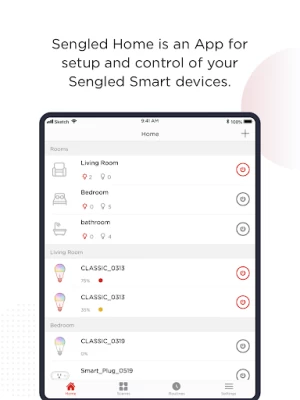
More About Sengled Home
CONTROL YOUR LIGHTS FROM ANYWHERE ON THIS PLANET
Either 1 foot away from your Sengled smart device, or 10,000 miles away from your home, as long as you have internet, you can control or check the status of your devices.
COLOR, COLOR TEMPERATURE AND BEYOND
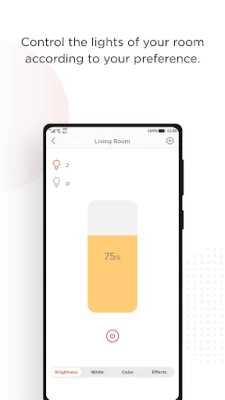
Transform your mobile device into a color palette, and your bulbs, your canvas. Choose from 16 million colors—or choose from Warm White to Day Light—and change the colors of your bulbs to match any mood you have.
ROOM ARRANGEMENT AND GROUPING
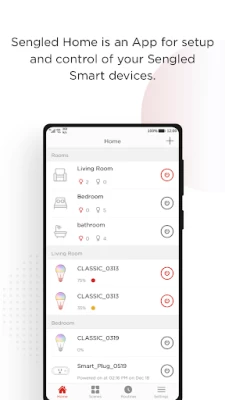
Sengled Home App enables you to easily bundle your smart LED lightbulbs into pre-set rooms, or create your own user defined rooms for grouping purposes.
FRONT PAGE OR WIDGET CONTROLS MOST OF YOUR DEVICES
With a simplified and optimized UI design, you can access and control most of the functions from the front page of the Sengled Home App. Scene control and Mobile home page Widget control even makes this process easier.
SMART LED GETS SMARTER WITH SENSORS
Sengled smart LED lights with built-in motion sensor can not only push notifications for any motion event, but also setup actions after detecting motion events. For example, turn on the lights in your bedroom when motion is detected in your backyard in the middle of the night. Sengled smart door sensor can also be used to link with your smart LED lights for event triggered actions.
SCHEDULES, SCENES AND ROUTINES
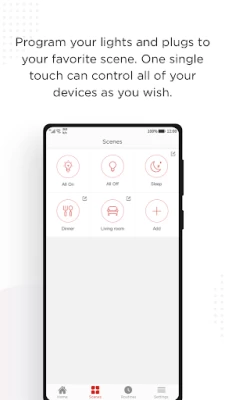
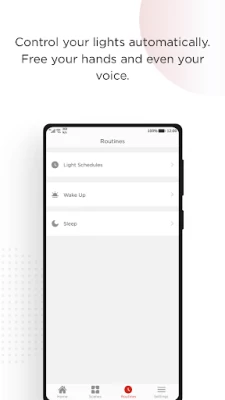
Either setup daily routines, such as waking or sleeping routines, for the convenience, or setup vacation routines, such as turning lights on/off to simulate people being home, for home security purposes. Scenes can be created for multi bulb or multi room control.
WAKE UP & SLEEP
Sengled smart LED bulbs can be programmed for gradual brightening and wake you up with lights naturally. Sleep schedule will control the Sengled smart LED bulbs in night light for delayed dimming.
LIGHT EFFECTS
Six light effects would help users to have more fun with their Sengled products during parties or holidays like Halloween and Christmas.
3rd PARTY PROGRAM:
After configuring the Sengled Home App, all the settings can be easily ported over to 3rd party programs, like IFTTT. You can expand your home automation with many more capabilities.
HELP WITH ALEXA, GOOGLE ASSISTANT, APPLE HOMEKIT AND MORE:
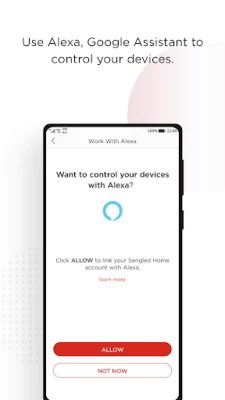
In-app help page can walk you through the process of setting up Amazon Alexa, Google Assistant, Apple HomeKit, IFTTT and more.
SAVE ENERGY
Every time you turn your Sengled smart device on or off, an event will be logged. You can check the performance page to see your cumulative power consumption for different devices.
Contact us:
Our development needs your support. Your opinions and suggestions will be appreciated.
Want to know more about Sengled smart products? Follow us on:
Official Site: sengled.com
Facebook: @Sengled
Twitter: @SengledUSA
Instagram: sengled
YouTube: Sengled
WeChat: Sengled生迪
Latest Version
2.4.9
July 15, 2024
Sengled Inc.
Travel & Local
Android
950,621
Free
com.sengled.life2
Report a Problem
User Reviews

Jon Boone
1 year ago
Absolutely horrible app. I honestly don't know who coded this but fire them, their conditionals are terrible and they honestly need to find another industry to work in. Right now I am fighting for my sanity trying to make it see the wifi I am currently connected to and have connected three other bulbs to. Even after refreshing the app twice and force closing it it suddenly cannot find my wifi. It's been 10 minutes of refreshing and even though my wifi is saved it cannot find it.

Steve Anderson
1 year ago
Used to be my favorite brand, not any more. I don't know what has happened to this app. I used it a while ago to get all my bulbs set up (zigbee) And it worked perfectly fine. Now it is nothing but issues. I get app closures, and so far any attempts to add a bulb has been unsuccessful even though it says it has added it. I've uninstalled and reinstalled the app, rebooted my phone, no significant improvement. S22 Ultra. Looks like I can't buy from SengLED anymore.

James Northcutt
1 year ago
Can't add a light. I unpaired a light and tried to add it again. I correctly put the light in pairing mode, but the app can't see it. The app also closes frequently while using it. And all Sengles products recently started to have issues with Google Home. The "Works with Google" menu flickers when you open it. Terrible app.

Austin Borreson
1 year ago
The app is not well designed. It closes constantly and links do not work most of the time. The app also does not let you select add devices, which is the whole purpose of the app. If you see this and just bought a sengled device, do yourself a favor and return the device and get a different brand.

James Sutton
1 year ago
I'm not a technical person, nor a wizard at troubleshooting problems. But the Sengled system I had before the update was simple to use, easy to add bulbs, easily understood. As a result we have dozens of these bulbs throughout our house. Now, none of them work, Alexa clearly states the hub these bulbs are connected to Alexa thru is not responding. I've reset the thing six times in the hope of success but not happening. This is the poster child for a development update effort gone bad.

Chloe Crockett
1 year ago
My lights reset themselves because of the power flickering and when I reconnected them it wont let me name them or add them to a room.. making them useless. The keyboard flickers and the app crashes. This has been a problem since the most recent update, I would think that it would have been fixed by now. My entire home is lit with these lights so I'd hope it gets fixed soon before I start using another companies smart lights.

Brian Mlenar
1 year ago
Up until 3 days ago it was great. Then it both stopped working and suddenly won't work with Alexa. When I emailed Sengled for help they sent back one entirely unhelpful reply telling me to disable my firewall, then send them a screenshot with my firewall info. No. Also, the system that was completely wifi before now will not work unless connected to the router with a cable. Now the app works but the system refuses to work with Alexa and Sengled won't answer me.

C
1 year ago
Sengled hub has been working for a bit but randomly have door sensors that won't work with the prescribed action they are set to do like turn lights on/off when leaving a room. It has never been the smoothest thing in the world but has actually been stable lately and working aside from the door sensor. The app has the sensor and it knows the doors are open or closed by the log however it doesn't do the task it's supposed to.

Mahad Askar
1 year ago
App doesn't work on latest Android (14) on s23 ultra, one UI 6.0. Can't type wifi password in, because keyboard keeps flickering, app keeps crashing, can't edit device names either because once again, the keyboard doesn't work on the latest update. I had to take out my old Samsung Note phone and use the old version of the app in there, just to make changes and setup/remove/add devices.

Sean Edwards
1 year ago
Used to be okay, but stopped working this morning, saying my device has lost internet connection when that is not true. UPDATE: service restored after several hours however I cannot get it to connect to my bulbs. It is at least showing me them again, but showing a yellow warning symbol. I tried deleting them and repairing them but it would instantly show the warning symbol again, saying that connection has been lost again. UPDATE 2: I was able to re-add devices after waiting another 20 minutes.

Amy R
1 year ago
Every time the privacy policy changes the app logs you out and all of the sengled bulbs stop working. You have to open the sengled app, check the box agreeing to the new privacy policy, and then login. After doing that some of the bulbs will start working on their own after turning the light switch off and on again but not all. This has been happening two to three times a year and it is super frustrating. I have three other brands of bulbs in my home but they never do that. Irritating!

Ashley P
1 year ago
The app is pretty much unusable. It's unstable and crashing all the time on my Pixel 7 Pro. I can't even change the name of a new lightbulb because the keyboard flickers on the screen and is unusable. Sengled has addressed issues I've written about before, but I'm pretty unhappy with their lack of support for this application. I might switch to another brand--despite being in their ecosystem for years--just because of the unreliable app.

Clay Cauley
1 year ago
Absolutely Terrible. The most recent update broke the search function so now you can't even search for bulbs, which is a huge pain because the bulbs disconnect over and over again constantly. Now you can't even reconnect them. The user experience is complete garbage. The app is slow, unresponsive and they consistently break it every time they update it. Save yourself the headache of a slightly lower price and just buy the better brand from the start. It's not worth it.

Kristopher Wainscott
1 year ago
App doesn't control my TV backlights. They stay on one scene once it connects to them and never change with what's on screen. The app won't even turn them on/off. The issue is the calibration step. Once that is complete, the lights become unresponsive. If I skip the calibration they will work at default settings but my lights are ran counterclockwise, which is not default, so the lighting is backwards.

Bobby Schreckengost Jr
1 year ago
We've had this product in our home and it worked very well for over a year The last 3 nights for some reason the schedule timer is not working. The schedule is not turning the lights on but is turning the lights off in the morning. I've reset it and that didn't fix it. There's obviously a problem with the app our internet signal is strong and good for all bulbs. I tried to contact this company through the app but it would not allow me to email through the link. I clicked it would blink not open.

Karina Powers
1 year ago
I have to agree with the MANY 1 star reviews. The app was a 4 or 5 star app until this last update. It made everything slower, more glitchy and just about useless. No longer will my lights turn on or off when they are scheduled to. The app crashes every 15-25 seconds. I can no longer connect light bulbs (this was never easy but now its impossible). WHATEVER YALL DID, UNDO IT. This app is awful and worthless now. Once I find another option for automatic lights, I'm switching. DONT GET THIS!

Lisa Hardy
1 year ago
If by fixed you mean, "created this issue when previously you had none" then maybe. I relocated 3 bulbs and can't add them back into the app, can't create a room, can't really do anything. It crashes every 20 seconds and the keyboard completely fails to launch. Haven't been in the app for a while but it worked flawlessly when I first set it up. These bulbs are too expensive to replace willy nilly. But that's what I'll have to do. What a worthless app.

Robert Sanchez
1 year ago
I have 3 brands of wifi lights in my home. Anytime I have an internet outage, the Sengled lights lose connection. The app constantly crashes when trying to fix the issue. I have to delete the lights and then re-ad them. I then have to add them again to Google home. The Wyze and Hue lights do not have this issue. The bulbs themselves work fine when working, but this seems like an issue that needs to be fixed. I have made sure the app is updated along with my phones firmware.

Al Zoot
1 year ago
I'd give this zero if I could. It's almost impossible to get it to recognize sengled bulbs that are only five feet away. No matter what I do, it insists "Search time out. No devices found.". Repeat about ten times and it will finally work. I think I'm just going to throw all my sengled devices in the trash, it's just way too much trouble to get it to sync with them. All my other smart devices work just fine. But not Sengled.

Katy Givens
1 year ago
I open the app & suddenly the screen goes back to wallpaper. The app is still open & I can switch to it but it continually closes to wallpaper. Also, there is no way to get to adding manually. I got there once accidentally when searching for the device failed but there seems to be no way to scan the QR code from the menus. I just want to add a light bulb which has been on the hub previously. The light bulb still works. I just can't get it to go back on the hub. Frustrating!









