
RF Analyzer
December 17, 2025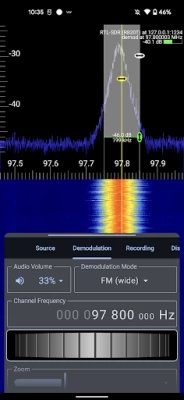
More About RF Analyzer
FEATURES
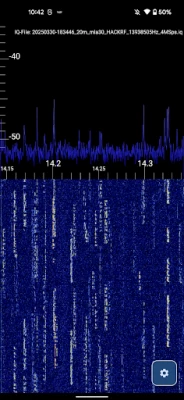
- Works with HackRF, RTL-SDR, Airspy, HydraSDR or pre-recorded IQ files
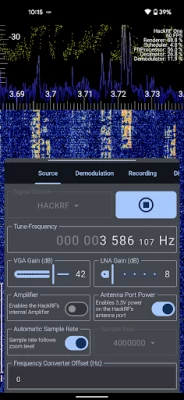
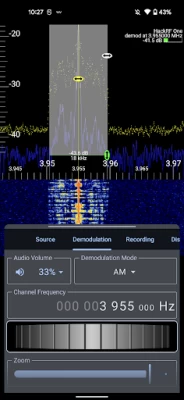
- View live spectrum (FFT) and waterfall plots
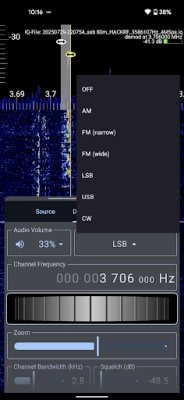
- Demodulate AM, FM, SSB, and CW signals
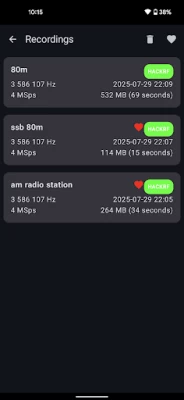
- Record raw IQ samples for offline analysis
- A responsive and modern Material Design interface
- Scroll, zoom, and tune through the bands
- Built-in context-aware help and a full offline in-app manual
PRICING
You can try all features for free within the 60 minutes test period (only actual analyzer usage counts - so enough time to test out all features with all your devices).
If you like it, a one-time in-app purchase unlocks the full version - no subscriptions, no accounts, no ads.
This app is a hobby project, built with passion and countless hours of work. Supporting the app helps me continue developing and improving it. Thank you! 🙏
REQUIREMENTS
- Android phone or tablet (with USB OTG support)
- Supported SDR hardware (HackRF, RTL-SDR, Airspy or HydraSDR)
- Note: The RTL-SDR Blog v4 is fully supported.
- USB OTG adapter (USB-A female to USB-C for modern phones)
- This is not necessary for SDRs with USB-C connector (e.g. the HydraSDR)
LEARN MORE
Want to go deeper? The full user manual is available with signal identification tips, ham radio basics, and more: https://demantz.github.io/RFAnalyzer/
Have fun exploring, learning, and listening to radio signals :)
73!
- Dennis (DM4NTZ), Heidelberg, Germany
LICENSE
This application is released under the GNU General Public License v2. It is free software and the source code is available on GitHub.
LEGAL ISSUES
Please note that I am not responsible for any legal issues caused by the usage of this application. Be responsible and comply with your local law!
Latest Version
2.1.1
December 17, 2025
RF Analyzer
Tools
Android
228,007
Free
com.mantz_it.rfanalyzer
Report a Problem
User Reviews

A Google user
7 years ago
Working great on a Samsung J9 Pro. with a NESDR Smart Dongle. Even tried with the Ham-It-Up upconverter for SW broadcasts (on a separate power supply) and no issues to report. Great app, for the short period of time I have used it.

Todd Mathews
5 years ago
Great app, however there isn't a way currently to navigate to lower frequencies - even with capable SDR hardware attached. Some navigation controls could be improved for ease of use (adjusting bandwidth & center point)

mike foster
3 months ago
edit- version 2 is way better! using it on my pixel 6 with RTL V4

Jason Kulhanek
3 months ago
Works on HTC One M9. Way cheaper paying for this app vs buying the portable unit.

Ed Kempe
3 years ago
working well. but (like all the others) there are some easy features left out. we need weighted tuning. if you don't know what that means it is as if you are spinning a heavy tuning knob. it keeps spinning. also an autoscan. manually flicking through 1ghz of band give me blisters on the finger

Felipe
2 weeks ago
os crashing after closing the app. Redmi 14

S Ali
3 months ago
Dennis Dear great app as always. Stay Blessed and Thank you so much for the awesome upgraded version.

Orange
2 months ago
i love this app with do wav fake rtl sdr but when I putted on 4625 khz on file is no sound fix this only work the 97 MHz THE sound

Turbine Dynamics
4 years ago
Very nice implementation, I actually prefer to use this over sdr touch and this is not only free, but sounds much cleaner on most of the frequencys I've tested on. Simple FM broadcast, Noaa. Be happy to pay for this with additional decoders but understand it's technically listed as an analyzer. Maybe a mode selection? Good work regardless!

Dave Todd
5 years ago
Well it would have been exactly what I was looking for except it refuses to go down into the ham bands. I like to play with old military radios and rather than deal with those clunky chunky knobs trying to find something I bought an SDR so I could waterfall and find something to aim the set at. This fit the bill until I got it finally down into the ham bands and it kept telling me that it can't go there. Pointless to make software it doesn't go where the Hardware can

Victor Skyba
3 months ago
amazing app. would also nice to have autoscale button in quic acces without need to go to settings. also add sweep mode for hack rf so we can view wider range

Aaron Cavanaugh
3 months ago
Please add channel list creator via an auto scan feature, also add mp3 recording. For 5 stars add an overlay for band identification like in sdr++ (along with tips on how to decide the signal that is found)

Rafal Firlag
3 months ago
Really nice app, however channel memory, step programming (6.25, 12.5 kHz etc.) and scan of banks as well as search from frequency to frequency would be very helpful.

Yatrib Ahariz
2 months ago
works great with my Galaxy Tab a9 and with hackrf1 thank you for the great app but AM sounds super dimm even with great signal

Aaron
2 months ago
Was disappointed of the switch to a paid app. Spent a few days thinking about it and concluded I'm just going to pay for it since it's a one time and it's still the best option for android. Perfect for portable use.

Vazgen Sargsyan
3 weeks ago
The only program that works properly on Android.I would really like to see the functionality of adding channels to memory. and sweep functionality to see spectrum with very large span

Pedro Rodriguez
1 month ago
I don't usually buy apps for android, but this one is awesome and worth it. One thing I found out after further testing is that I cant enable the bias-T on my rtl-sdr V4. Oh, never mind that, you need to stop the dongle before turning it on.

Steve Pietras
3 weeks ago
I am very happy with the performance of this APP. I use it with my RTL-SDR (USB dongle). The author of the app was VERY quick to respond to my questions. It is a handy demod companion for my Tiny SA. I used it at a high school football game to hunt down a referee wireless microphone.

don t
2 years ago
Works for a few seconds then static. I downloaded the rtl-str driver and said it installed correctly. Then I downloaded RF analyzer. Set it up properly, but the only station I could get was 1 FM, and 1 WX. Everything else was static. And then it would only work for a few seconds and disconnect. I'm on a galaxy s21 ultra so it couldn't be the phone. I guess it's time to give up.

Donald Stevens
1 month ago
I'm going to assume that the only way to view RF data using a phone is going to be by using a dongle to capture it? I looked at this to see if there was a rf signal turning on lights in my house or if it was just a bad controller and thankfully, if I understand the tutorial correctly, I don't need to waste time looking at other apps because this is not within a phone's capability without external hardware. This app does look to be very capable though with the correct hardware.









