

MyDolphin
July 21, 2024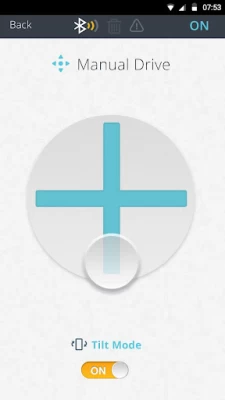
More About MyDolphin
Latest Version
2.1.16
July 21, 2024
Maytronics
Travel & Local
Android
166,040
Free
com.maytronics.mydolphin
Report a Problem
User Reviews

Dan Paul
4 years ago
The cleaner is excellent. The app for blue tooth was poorly designed. The scheduling was dropping off and needed rescheduling frequently. I contacted the app developer through this rating process and I am very impressed that they not only responded straight away, but took my issues seriously and fixed the problem. I did as they advised, deleted the app and reloaded it, re-registered the cleaner and it's all fixed. Very happy

Austin Stallard
4 years ago
UTTERLY USELESS. All the poor reviews for this app are well deserved. It's a shame I can't give it ZERO stars. Once the app is installed, it asks for an email. But it doesn't recognize a legit email address. So there's an option to SKIP. Then it searches and finds the control module but cannot connect, even after following instructions to reset.

A Google user
6 years ago
Pretty hard to control with the latency. You need to stand next to the power supply at all times to stay connected. As others have mentioned, if you cannot connect, validate you have GPS location on. There should be a prompt to turn it on along with the Bluetooth prompt. Location would not be required if you would let us connect via the OS Bluetooth settings instead of in app. If your looking for a robot you can control yourself, this app will disappoint, at least for the M400 robot.
A Google user
5 years ago
Like many others, the latest update has rendered the app totally useless. The error message isn't even correct. “The power supply does not recognize the robot“. In fact, the robot runs perfectly well from the power supply, it is only the app which can't see the robot. S200 (Australia) + android. Other limitations of the app - very slow bluetooth connection; unable to change name from New Power Supply; does not show current time

Simon Marais
1 year ago
This useless app renders my expensive Dolphin cleaner pointless. My Samsung s23 Ultra cannot "see" the dolphins Bluetooth signal. Tried multiple times. Zero help and service from my ZA and Australian suppliers. I even used an older phone to test as they said it could be the Bluetooth version that was a problem. Now the pricey cleaner is effectively a paperweight as it barely does anything without the app.

Ilias Boutsiavaras
1 year ago
It's good when it wants to work! It constantly loses the Bluetooth connection and my phone, which is an S21 Ultra with the latest software, simply can't find it when I open the app, even though I've uninstalled it and reinstalled the app several times! It is downright frustrating when you've paid good money to have these things, yet they simply don't work. I should have just bought the base model machine without all the gimmicks

Rich Terjesen
5 years ago
Sick of maytronics. My robot stopped working 2 months after I got it... bad cable. It was replaced and then the app stopped working. i took it back after the season and the shop replaced the cable again. still same problems. i finally paid to ship it back to maytronics and they ran their diagnostics on it and shipped it out in a day. i tried it again and still not working. all they said in the receipt was to go to airplane mode and repeat process whatever that means.
A Google user
5 years ago
This is the worse app I have ever used and that's saying a lot!! It doesn't change the settings and only pauses and will sit there until the battery is completely drained. I know cause i let it sit for hours waiting for it to save the settings. Looks like they have a child programming their crappy app. So I'm going to send the unit back and buy another pool robot that app works better then this one!!

Marty Brown
4 years ago
Maytronics has upped their game with this controller. My old Dolphin robot was refusing to clean, so Maytronics replaced it with a better model. (THANK YOU?) With it comes this vastly upgraded app which provides much better control. Among my favorite new features is the ability to 'call' your cleaning buddy over to the side of the pool, then crawl up the side so you can grab and clean it. Wow.
A Google user
6 years ago
Connecting was frustrating. Make sure your location is on, allow the app location info, bluetooth on in pairing mode, and stand somewhere with good wifi/data, not necessarily 1m from the power supply. The pairing process makes you feel powerless, with that dreaded spinning circle and no feedback. When I finally paired, any attempt to change the cleaning mode crashed the app (I sent system logs). Trying to enter manual drive -> correct screen pops up but immediately disappears - tried this 15x.
A Google user
7 years ago
S300i users, you need this app to access the cleaning modes, delayed start, and schedules functions which is partly why you chose the 300i over the regular 300. Yes you can also steer from within the app, but you have to get it to work first. MAKE SURE YOU HAVE GPS TURNED ON in addition to Bluetooth! The app itself is finnicky. You may need to back out of the app and restart it if you leave the app to check an email as it seems to not like reconnecting. If you are having trouble connecting, back out of app, turn on GPS and BT, then, relaunch app while you are close to control panel, good luck!
A Google user
5 years ago
The app freezes after every single command. The only thing I have been able to do with it is connect and then set a schedule for cleaning. But even after setting it the app froze/gets stuck in a constant "updating" device mode which freezes all other setting. I wasn't even sure the schedule had took. All the other functions listed like cleaning modes and manual control won't even load. This app needs attention desperately.

Daren J. Mongello
5 years ago
AS OF MAY 13th, 2020: DO NOT USE THIS APP UNTIL THEY FIX IT. I have the m500. The old app worked great. No more. Neither of the newer replacement app (Dolphin and Dolphin+) can connect with the M500's power source. Each app says I need to use the other one. And when my robot shows up, it's listed as a different model on each app. Like many others, I am concerned that they canceled a good working app and replaced it with apps that were not properly tested before being published.
A Google user
6 years ago
You NEED the option to have the user set a default cleaning duration and cleaning type. For example, when my pool is dirty, I want the dolphin to run on ultra clean mode for 3.5 hours by default. Instead, every time i turn it on i have to adjust the settings. At the very least it should default to the most recently used cleaning setting and it doesn't even do that. User Experience Fail.
A Google user
6 years ago
Seems like the app is easy to use but whenever I try to change the cleaning mode the app disconnects from the controller and the app has to be restated. Manual drive doesn't work, the screen pops up but then switches back to the main screen before anything can be done. It seems like the app needs more bug fixes.

Joe DeNave
5 years ago
App used to work fine. Now with the latest update, it says the power supply does not recognise the robot. This is not correct as I can manually control the robot from the power supply. Can't change schedule or anything. Please revert to working code. Update 4/18 support reached out yesterday with a fix it sheet that didn't change anything. Will update after next contact. Maytronics stating that it isn't a Bluetooth model. I reinstalled the last version and it works great again.

Paul Baaahziinga
5 years ago
Just bought an active 30i, and the app worked great. Not sure if it's just not compatible with recent updates, but it doesn't connect to the cleaner any more. It finds it initially, then won't fully connect, loses the signal (even though I'm literally 1 foot from the power supply) and keeps cycling to search for nearby dolphins. Worked on my data connection at the local Pinch a Penny, then now won't connect at home through wifi even though my phone has a 500MB connection.
A Google user
5 years ago
After using the app for a year it no longer connects to the power supply. Contacted support and they're telling me that the app is not compatible with my cleaner even though my manual came with directions on how to use it and the power supply clearly has the icons for Bluetooth and the phone and it worked just fine for a year. They're telling me it was mistakenly advertise to be compatible.
A Google user
6 years ago
Just got a Nautilus CC and like others on the thread was driving myself crazy trying to get this app to work. Once I stepped away from it and did a little research, I discovered that the CC does not support this app. It requires the Triton PS Plus. I guess what is confusing is that they must use the same controller so the option is there just not functional. Surprisingly however, the one option the CC supports (Weekly Scheduler) does work with the app, even though it technically shouldn't. I give it 4 stars just for that. Hope this helps others. Amazon has a nice chart that shows what each model supports...

Eric
5 years ago
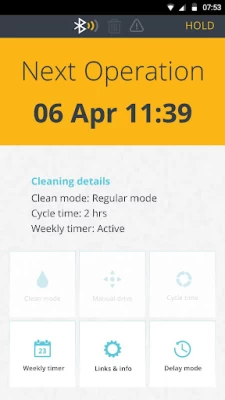
Works but no attention to detail. For example, when robot is in a cleaning cycle, app just shows "cleaning". Be nice if the app would show how much time is left. Also, the app does not show a map of where the robot has traveled like some vacuum cleaners do. Paid a lot of money for the bluetooth connected version and basically got a bluetooth on/off switch and a scheduler. I'm a software guy and I just think more could have been done. On a positive note, the robot itself does a great job.









