

Hubble Connect for VerveCam
August 10, 2024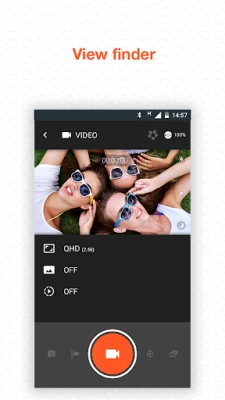
More About Hubble Connect for VerveCam
• Time-lapse photo (2secs / 3secs / 5secs / 10secs / 30secs / 60secs)
• Loop recording (5mins / 10mins / 20mins / 30mins / 60mins)
• Photo/Video sharing through social media Facebook / Twitter
• 4MP photo capturing
• Sleek, hands-free, wearable design with a wide range of mounting options
• 1080p Live streaming via Youtube
Latest Version
v2.0.1(97)
August 10, 2024
Hubble Connected
Travel & Local
Android
9,706
Free
com.hubbleconnected.vervecam
Report a Problem
User Reviews

A Google user
6 years ago
App (version date 11 March, 2019) is unable to view the taken photos and videos after connected with verve cam with my HTC U11 Android 8.0.0. Please solve it.
A Google user
7 years ago
It doesn't work. It can't connect to the camera. I taught it was the camera got it changed and still the same problem.
A Google user
7 years ago
Been told an update would be available in two weeks nearly month ago. Doesn't work with the latest android. Don't tell that when they are selling them.

Nathan
4 years ago
Doesn't work. Everything stalls - cannot format card, cannot update firmware so cannot even record any footage and use a sd card adapter. Absolute rubbish.
A Google user
6 years ago
i just can't connect it to my g6 plus, neither Bluetooth, nor wifi, it just doesn't work, and tried with my Huawei phone, worked just perfect, wow...
A Google user
7 years ago
Using my OnePlus 5t and the app is useless. I can't change any settings on my VerveCam and won't let me take pictures or videos from the app. I planned to use my camera for my motorcycle and it's worse than my original camera all because of this app.
A Google user
6 years ago
Updated Mar 11 2019: waiting for this update for 1 year and still doesnt work on android 8 and android 9 phone... drop 2 stars to 1 star now original comment on april 2018 Using one plus 3t and essential phone ... Both run android all I can get is a blank black screen ... Using my mum Asus zenphone 3 it works ... So please update apps to support android 8.0

Alan Stewart
4 years ago
Absolutely terrible,I was really looking forward to using this camera on my up-to-date android phone but it won't connect to the internet even though is a vgood speed and an excellent signal,money wasted.thanks for nothing Motorola.

iamnumberwan
4 years ago
I regret buying the verve cam plus coz it is so useless! This app is rubbish! Aways disconnects with the cam and cannot even make a good video shoot! Also when the video is already downloaded on the ohone, could not even play! Get back to your senses whoever was in charge if this rubbish app
A Google user
6 years ago
i can´t pair it with any phone , the camera works, but i wanted to pair a shooter button, and i couldn't either .... does enyone know how? how do i fix the pairing with my phone, and if i can pair the shooting button? no puedo conectarlo a mi telefono la app no detecta la camara. ademas quisiera usar un boton disparador, alguien sabe si se puede y como? y como soluciono el problema de la app?

J Estevez
5 years ago
Everything that this man said is so true I don't need to say anything. I am never buying a Motorola product again. Back in the day it was good now it's embarrassing to give this as a gift or any other products of theirs.I have the cameras for the house and they're having the same issue. Motorola has fallen out of the game. All the issues that you guys have with the firmware.You need new people to design some real good apps.... You have lost a lot of customers and your customer service sucks nobody responds.

Jim C
3 years ago
Three months of endlessly trying to get connected and to work. APP is useless, the camera obviously useless because you can't control it, 16 emails unanswered by support. So I'm out $. Something you should consider google considers Hubble software unsafe and blocks it from accessing my YouTube account. So maybe it's all a big scam. Read other reviews nobody is getting it to work right
A Google user
6 years ago
This app is not working at all. It needs a hefty update to correct it's functionality. I just got the VerveCam+ and the app and device will not pair, period. Hubble Connect needs to address this issue IMMEDIATELY. I like the camera but not the service in the app.
A Google user
6 years ago
What a desaster! Not able to connect VerveCam+ with App on an Android 9 phone, not able to update firmware, not able to find any support on listed urls in manual, not able to find any support on hubbleconnected. The ticket template does not know the product. Even 1 star is too much!
A Google user
6 years ago
Not a good app. The connection with the cam is very difficult and doesn't happen most of the time. Firmware update isn't working either. And there's no any way to make the app useful, it constantly lags and crashes.

Konstantinos Rigatos
3 years ago
totally useless, for apps like this one, gplay must have a minus star rating option, camera takes forever to connect if connect and then crashes. over the last 10 days only once connected and crashed , keeps forgetting connection info for Wi-Fi and BT. shame because camera is very good.

Phil Loucas
5 years ago
Had a few connection issues at first but as soon as the cameras firmware was upgraded, no issues. Great little camera. App is quite basic but it does what it says it will do. Ideal for quick videos on the go. If you have problems connecting, stick with it. It's worth the wait.
A Google user
6 years ago
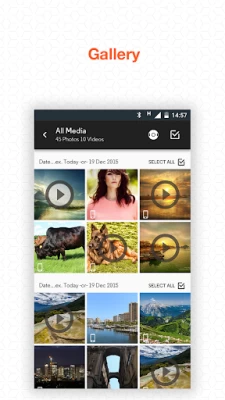
With the last update now I'm able to connect successfully to the cam without errors, so that's an improvement on previous version (also my phone's been recently updated to android Pie, it's a Samsung S8+) However, there are still some issues I'm experiencing, mainly because it asks me to update cam's firmware before using it, when I do so the app crashes. Apart from that, I'm now able to view pictures and videos, but can't save 'em to my phone. 'Cause of the firmware I guess?

Sara Takashima
3 years ago
As I understood it, the app was designed to control camera settings and to actually remote control the camera. It does nothing of these and if I attempt to look at videos and pictures taken, the app stopps service entirely. My firmware was updated on day one, and I simply can't control the cam by using the app. Can't even switch between loop recording and time lapse. Sad. The camera itself works for me, but the one my husband uses is set to time lapse and guess what? We can't switch that off.
A Google user
6 years ago
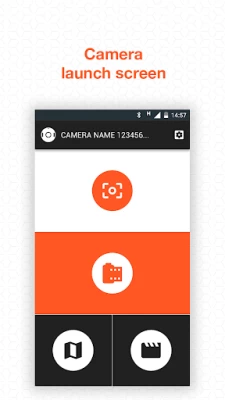
Wish I could say I've seen a lot of worse apps. But no, this is really terrible. So, let's start from the beginning. The Vervecam+ is an awesome, hockey-puck sized camera. Somewhat small, in my tests it has recorded about ~1h30m of video in its highest (~2.5K) resolution, and only stopped recording because my microsd card had run out of space (I put in a 16GB card, but the camera only supports up to 32GB the manual says). It also comes with a lot of accessories, from a lanyard to carry around on your neck to a waterproof case that would rival a GoPro. The app, however, is horrendous. I feel like the developers would like me to commit to an obscene act with myself whenever I open it. If they sent me a pound of glitter on the mail that would explode on my face when I opened it while it played an audio file insulting me I would feel less offended. This is how bad this app is. The button controls on the Vervecam+ are somewhate intuitive. The power button, when held, turns the camera on or off, and if you press it you can change from video to photos to livestream (I didn't even try this last one). The shutter button either takes a picture or starts and stops recording. Very good. But the good part stops here You may connect to the camera with either Bluetooth or Wifi. But the app first connects to the Camera via Bluetooth, and then asks you to set your smartphone wifi network to the camera access point. For me, after I connected to the wifi access point, it kept asking if I wanted to pair on Bluetooth, which I would love to, but it never works, instead it keeps me waiting like I got nothing better to do. Whenever you give up and connect to it via wifi only, it opens a clunky menu, with user interface colours that on my smartphone (Moto Z3 play, Android 9) were a dark font with dark background. It shows options for the video resolution+fps, slow motion, white balance and WDR (I would think it is HDR, but was never able to turn it on and see for myself). You can change modes to photo or timelapse or looping video. Or you could, if this horrible app actually worked. Whenever I try to set up anything, and set it to record through the app, it does nothing. Whenever I set the camera to record with the buttons as the app is worse than useless, it starts recording at the highest resolution. What grinds my gears is: I want to record Full HD (1920x1080) at 60fps, always, but I am not able to set any defaults. The options menu would let you format the microsd card. But pay attention to the "would" part: you may click it, but it never does anything. So, all in all, this hardware seems well-engineered, but the app is probably one of the most disgusting cesspools of incompetence I have ever had the unpleasant feeling of being forced to use. I am offended by this level of low-quality amateur attempt to do something marginally useful. Until then, I have uninstalled this and I will be using only the camera as a standalone gadget and copying the files to my PC via the USB cable because even though it is somewhat primitive in use, it feels less of a pain than using this. Having said all that, how can the developers possibly improve this? - Do not depend only on the app. Allow for some configuration on the SD card. I own a chinese wi-fi sd adapter that, if it finds a configuration file (.ini format) on its root, it sets configuration from that. If not, then sets to the hardware defaults. It would not force people to have an android phone to set the camera up. - Make up your mind about bluetooth or wifi. Either one or the other. - Allow for a web interface configuration. It is sure to support any embeddable http server with any rudimentary interface that would be less worse than this.









