

FltPlan Go
June 18, 2024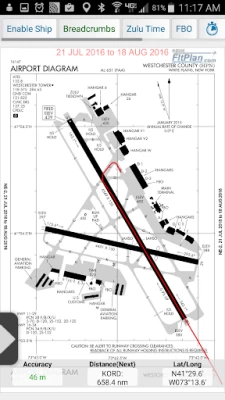


More About FltPlan Go
• NavLogs are automatically synced and downloaded for offline use
• Create and file your flight plan on FltPlan Go to sync to FltPlan.com
FltPlan Go delivers powerful routing, weather, mapping features, and comprehensive aviation information including:
AIRPORTS:
• Airport & FBO Information including current fuel prices
• Geo-Referenced approach plates & airport diagrams (U.S & Canada)
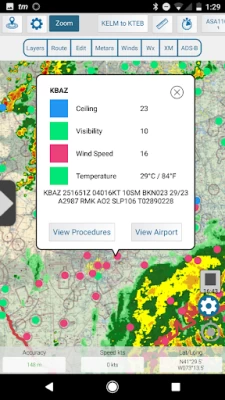
• Weather, including METARs, TAFs, PIREPs, & MOS
• NOTAMs & Remarks
MAPS:
• Sync FltPlan.com flight plans and interactively edit on the map
• File a flight plan from within FltPlan Go
• Moving maps with sectionals, enroute charts, & more
• Overlay approach plates & procedures on the map
• Layers including SUAs, TFRs, State Outline, Airports, Fuel Prices, CAP Grid, Stadiums, and Customs
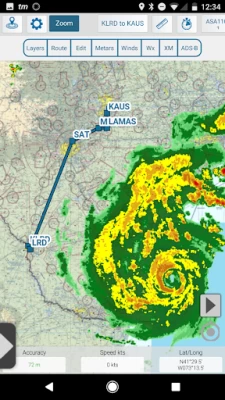
• Display METARs, Winds, and animated Weather on the map
• Display MOS weather forecasts (up to 4 days out) on the map
• Breadcrumbs with enhanced playback
• Split Screen to view information simultaneously, including airports, procedures, NavLogs, Howgozit, Checklists, & More
• Display Search & Rescue patterns
• View Howgozit to track real time progress of your flight
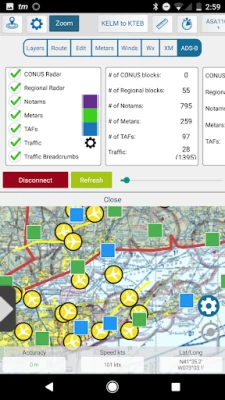
• Overlay in-flight ADS-B traffic & weather or XM Weather*
NAVLOGS:
• NavLogs automatically sync and download for offline use
• Email or print NavLogs from within FltPlan Go
ADDITIONAL FEATURES:
• Weight & Balance - create computations with the option to email
• eLogbook - create logbook entries to sync to our eLogbook program
• Checklists - synced from FltPlan.com for your specific aircraft
• Binders - create flight specific binders with documents or procedures, airports, NavLogs, weather briefs, & more
• Weather - search airport or route weather
• Tracking - view live tracking
• PDCs
• Cloud Tops
• Aviation Calculators
• Access to FltPlan.com
EXTERNAL:
AVIONICS
• Garmin
• Dynon SkyView
• Avidyne IFD Series
ADS-B
• Garmin
• Dual XGPS 170/190
• Dynon D2
• FreeFlight
• Pathfinder
• iLevil SW
• L-3 Lynx
• SkyGuard
• Stratux
• Custom Unit
GPS
• Dual XGPS 150
• Bad Elf
APP-TO-APP
• Garmin Pilot
SIMULATORS
• X-Plane Simulator
• FSX & Prepar3D
*Subscription/Unit Required
*Continued use of GPS running in the background can dramatically decrease
battery life.
FltPlan has grown into the largest flight planning company in North America. FltPlan covers the U.S., Canada, Mexico, Central America, the Caribbean, Panama, and parts of Venezuela and Columbia. FltPlan’s 165,000-plus active, registered users file more than 55% of all N#-registered flight plans. FltPlan Go is a part of FltPlan's comprehensive system that includes free, web-based flight planning and filing and a full range of premium services. FltPlan has more than 18 years of general aviation experience, giving pilots access to the best support team in the business.
24/7 FltPlan Go support is available at Tech@FltPlan.com
Latest Version
5.0.19
June 18, 2024
FltPlan.com
Travel & Local
Android
135,557
Free
com.fltplan.go
Report a Problem
User Reviews

Jeremiah Harrington
4 years ago
edit - where in my original review did I say I had to hit cancel before the download finished? Pay attention. Had to go to droidEFB, since the last update every time I try to download airport database or new maps I get a failed to initialize map service or error timeout message with a strong signal, so it ain't on my end, especially when droidEFB downloaded all it's files in the time it took FPG to download the worldmap.

Vincent R (Flagada002)
3 years ago
Can't pack anything with you, so when you're airborne, you get the "no internet connection" msg. Too bad. Plus on Android, the GPS location works the first time you turn the app on in flight... then afterwards it's gone. And yes my location permission is set to always.

Robert Fonnesbeck
3 years ago
Was a Great app, but after updating the maps, it just crashes every time i open it with in 10-15 seconds. too bad, i really like this app. it seems to still be working fine on my ipad but both of my androids (9.1) wont run it anymore. before this mess i would have given them a 5 star plus.

A Google user
6 years ago
Last update broke drag and drop map waypoint creation. When you tap the map to create a waypoint you can no longer make precise alterations by dragging your finger around with the circle cursor, or spit a track and create a new checkpoint...pretty much breaks the whole point of the map screen. This problem has always existed with my Andriod phone, but now its happening to my iPad that I actually use in the plane.
A Google user
7 years ago
Update: it appears to be an issue with my password manager, LastPass, and the way it interacts with FltPlan. Works for me by manually entering my credentials. Old review (left in case someone else has similar issues): FltPlan Go worked great until I moved from a Pixel 2 to a Pixel 2 XL, with Android 9 running. Now I cannot log in. It basically spins forever, and hangs the "back" button. I have to basically kill the app. Have reported this to tech support, have done the usual enable storage, clear it, reinstall, etc. Nothing. Too bad - I like this app and now am about to buy another app.

Brian McGrath
4 years ago
Recently purchased a Samsung Galaxy Tab A7 Lite (Android 11) to use as a dedicated EFB with FltPlan Go. FltPlan Go crashed immediately whenever I accessed the MAP tab or attempt any actions in the DOWNLOAD tab. I've used this app on iPads and older Android versions (and Android 12 on a Pixel) and it worked great! After reporting the issue to developer, I received this response: "the Samsung Galaxy Tab A7 is not compatible with our mapping software (its related to the processor on the specific device) we are looking into it but do not have an ETA." It's a great app, but it's no use if it won't run on your hardware - so beware. Update: Replaced the Tab A7 Lite with the Samsung Galaxy Tab A 8, which uses the Snapdragon 429 processor. Confirmed with support that they have had no issues with that chipset. Can now confirm it runs great on this tablet. If you load the map data on an SD card, even a very high performance one, access speeds will suffer, but will still be very usable. One final comment ... It would be helpful if FltPlan Go published a hardware compatibility list, but it's still a very well built and full featured EFB application.

D S
1 year ago
Fltplan go is the best piece of free software I use on a regular basis. App is pretty stable, easy to use and intuitive. I'd like to see some aspects of the IOS app available on Android but other than that it's great. Some suggestions on ways forward would be: Ability to pull up waypoint info/coordinates Being able to use/convert to/from MGRS A less clunky SAR tool

Jessica Pekarek
5 years ago
Utterly useless. This app is a joke. After download, it launches and attempts to download data, without my permission. When I want to choose to save data on my memory card, it complains that I cannot do that since I am currently downloading. And the download never finishes, nor can I stop it. Overloaded servers? Outdated address? No idea. The app just won't do anything while downloading. Utterly useless if I cannot use it at all. Does anybody even test these updates? Completely disappointed.
A Google user
6 years ago
Good technical support. Very useful app for pilots in the US. It's the only application which is free and gives a premium feeling just like ForeFlight. I saved a lot of money using it. I urge the developers to start adding content of other Countries as well and take it on a Global Scale because I am confident that FltPlan Go can be useful to all the pilots in the world. Especially the general aviation and trainee pilots.

Damon Willens
4 years ago
Suddenly app is non responsive on startup in Android 11. No new changes to OS or app that I can see. Never had a problem before. Uninstalled and deleted all data and reinstalled did not help. Edit: I gave them back their stars because they responded to my concerns literally in minutes. Not sure of the problem w Android 11 but a reinstall seems to have fixed it.
A Google user
6 years ago
had some problems of actually not knowing how to download airport diagram and some other stuff.. after emailing the tech it turned out to be an easy fix.. love the way the app is organized, the graphics and layout design could be bit more beautiful..but thats now what i am after.. very easy to use everything is well layed out for easy access.. must have for every pilot. small request.. can we add a scratch pad with ATIS form? and clearance form scratch pad.. maybe? .. overall love the app

Sefardí -
4 years ago
Tried other similar apps and this one beats them all! I'm a 40 yrs + user of Microsoft Flight Simulator and I think this add-on is one of the best yet! The ease of operation for a beginner is beyond the scope of any explanation. This brings the old FSX back to life and almost on par with the new MSFS. I've been flying the "The Long Way Home" saga of the 1941 fly of the B314 Flying Boat and its a completely different world when seen on the satellite map. San Pedro and Auckland will never be the same. The crew of the Pacific Clipper flew 'by the seat of their pants' I flew around the world thanks to FltPlan Go! Thanks guys for such an outlandish and free app.

Amore Tennis
4 years ago
Best FREE App / EFB! I am a student pilot on budget and did not want to spend big $ on apps yet. I tried number of apps, but did not found easy to use and reasonably priced. This app has it all and it is FREE. It also works awesome with my stratux ads-b which I built. It works on both Android and iOS, unlike, some apps force you to buy expensive hardware and make it outdated every 2 years, which is very expensive. I highly recommend this app not only to students but also to pilots.

Dave Wewers
3 years ago
METAR reports consistently fail to refresh. Current report loads when you open the app, but then will not refresh for at least several hours, even after tapping the "refresh" button. I have reported to support, with screenshots of the app stuck on the old METAR, and shots of the reports that had been issued since. Response was basically that it doesn't happen.

Ethan Aeschbacher
5 years ago
I Love this app, it has always been reliable with airport diagrams and charts, how ever recently I've discovered that when I go onto the website via the app, it wouldn't load any airport charts under navigation. I would love to see this fixed asap, I also cant get ahold of the Tech support because that wont load, the charts say something about a PDF. Format I believe.

Tyler Jackson
2 years ago
I have never seen a better *FREE* EFB. Ever. Everything you need for a quick reference on Android for FREE. It may not be the most aesthetically pleasing out there, and it's definitely not perfect, but it's fan-freaking-tastic. I use ForeFlight on my iPad for actual flying and serious flight planning. But I don't wanna have to grab my iPad everytime I just wanna check the METAR, get accurate and up-to-date airport info, or review procedures and checklists. For Android this is the best out there.

Jim Ryan
5 years ago
DOESN'T WORK. Even on a brand-new Samsung Galaxy Note 10+. When you try to log in it just hangs at "Logging in" and never finishes logging in. I deleted all cache & data, uninstalled and reinstalled several times. Same result. I've waited 30 minutes and still the screen is stuck at "Logging in". Also, even though I spent hours loading my checklists for my aircraft into FltPlan Go, they were all randomly deleted for no reason. They're just gone. It's really hard to enter checklists using their website because you can't easily insert new steps into the middle. It literally took me hours to create them, and now they're all gone.

Eyal Laghaie
4 years ago
Update: i am raising my rating due to the speed that they responded to my email. The problem still appears to be there, the crashing and gps freeze when paired with the g1000. Also i feel that the app is altogether very heavy like it takes alot of ram to move from page to page, and I'm using a Samsung Tab S3, so not a slow device. But like i said they responded pretty fast when i emailed them. If they can figure out these last few items and get flyaway charts integrated then easy 5 stars .

Myc Clark
2 years ago
A lot of rough edges but it mostly works. The app will crash when loading the map, not great when trying to navigate and fly at the same time. When loading the map the map will sometimes load zoomed all the way out forcing me to zoom in multiple times. Again, not ideal when trying to navigate and fly at the same time. The app shows decommissioned runways as active on the map. With a lot of polish, it could be great.

William
1 year ago
This app has been a decently reliable backup aviation weather source for me the last 8 years. Unfortunately, they have a habit of breaking things with new updates that work fine before. This time they seem to have deleted most of the weather map overlays without any explanation... please bring back surface analysis, echo tops etc. The only options left are a general radar setting and visible/ir









