

Clefs: Music Reading Trainer
July 30, 2024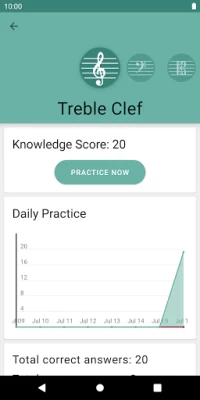

More About Clefs: Music Reading Trainer
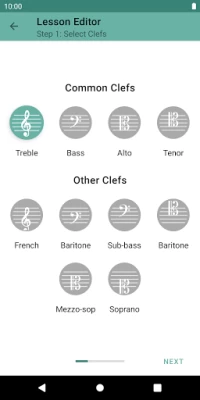
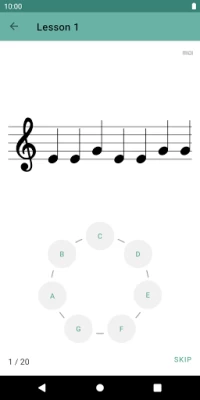
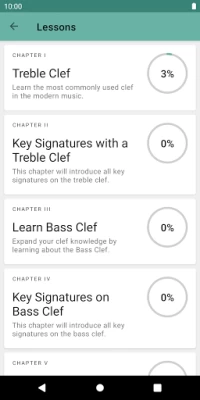
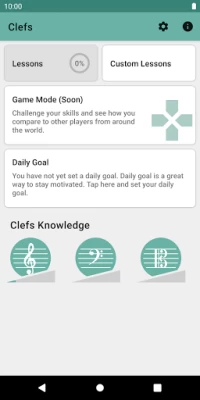
Clefs includes a course seven chapters of total over 200 music reading and writing lessons designed in progression from simplest to most difficult to teach you reading music on most popular clefs in modern music. A powerful custom exercise editor will empower you to create fine tuned exercises for your demands and needs.
Features:
* More than 200 music reading and writing lessons split into 7 chapters with exams
* Powerful custom lesson editor
* Introductory theory for each chapter
* Detailed daily statistics
* Daily exercises generated specifically for you
* Support for using your MIDI-keyboard in sight reading exercises
* Competitive Game mode (coming soon)
* Simple and beautiful design supporting light and dark themes.
Clef comes from developers of Perfect Ear - a highly rated the most downloaded music education app in the Play Store.
Latest Version
1.0.48
July 30, 2024
Crazy Ootka Software AB
Education
Android
622,624
Free
com.crazyootka.clefs
Report a Problem
User Reviews

Carmaela 26
4 years ago
Nice app. It's helping me for sure. My only complaint is having to drag a note to the staff. It's supposed to help you write a note quickly but on my phone, it doesn't akways drop where I want it and it marks it wring, even though I know where the note is supposed to go. It's frustrating that you can't turn this off. I want more exercises that simply show the note and you hit which note it is. That's the only reason I give it 4 stars and not 5. Great app overall.

Vinicius Baggio Fuentes
4 years ago
Fantastic app, no ads. I've been using their other app, Perfect Ear, and recently started using this one. Stable, well built (clever way to write notes with the drag n drop, although sometimes I miss a note, but it isn't s big deal at all) and I already can feel the difference on my reading time. Well done.

Gage Bryers
3 years ago
So fun very exciting! I've always wanted to read music and this app is making it so easy to get started. Once I know the treble clef and practice all the different keys I feel like I'll be ready for other independent resources I've collected and failed at through the years. This app is a great place to get started. Not too much about tempo and rythem. But their other app might cover that more.

Quail Bert
5 years ago
The quality and overall experience is exactly as one would expect from this developer. If one requires a random generation of notes to sight read, this is a complete dream. There's an option for midi keyboard input, however, it may be in beta currently as I'm getting double inputs on press & release (it's a Yamaha reface CS). Also, I wish in that mode the unused input method would hide itself. But anyway, surely that'll be worked out. As it is the touch screen options are more than sufficient.

Shaun Reich
4 years ago
This app is really quite great. With it I can make custom ones, it automatically generates new practice sessions and reminds me.. You've thought of a lot here and did it well. A few things I'd like improved upon, another thing I really wish there was an option to label the keys on the keyboard.Or to display the notes on the keys only when you get it wrong. I would also like it to mix up the rhythm along with the notes That way it trains your mind to see whole notes half notes quarter notes 16th

Hannah C
4 years ago
I love this app. It's easy to use, and makes learning to read so easy and fun. The Stave Writing exercises could use some work. I don't like how it uses A4 and C6 terminology to tell you what note to input. I often get it wrong by just an octave. I wish it could also play the note it wanted you to write, because often when I'm writing in real life, I'm just trying to get down the sounds that are in my head, I don't care about the note names. Still, I love this app. I definitely recommend it.

Chauncey Hoover
4 years ago
Great app, very simple and customizable. You can easily change your input method (android device or MIDI input) per session, enable/disable notifications and daily practice reminders, and more! My only complaint is I found a bug with MIDI input: I have it set to fire the MIDI event on Key Press instead of Key Release, but it still only fires it on Key Release. I'm sure it's a small oversight, but fixing that would make the app perfect!

Earl B
3 years ago
This app is really useful and helpful, however, it starts asking for you to place notes in particular octaves without explaining octaves at all. I had to Google to even figure out what they were called. A lesson to explain the different octaves would be extremely helpful. I have no experience reading music. Add a lesson on this subject and you'll get 5 stars from me. Something as simple as.. "the middle C is usually C4", would have significantly helped me. Thanks for the app!

water fish
2 years ago
Nice idea. Not sure if this app will be actively updated in the future, but it would be nice to have the option to enter a "fullscreen mode" when the device is connected via MIDI, so that the keyboard/note circle is not visible when using an actual keyboard instrument as input. Additionally, I think an option to play two clefs at once instead of switching between them would be more helpful for piano players. Also, there are bugs.

Jeff Brinton
3 years ago
Wow!!! I have been in music programs for more than 20 years yet I have always been poor at overall sight reading. I have tried many different programs, lessons and apps and I still never felt like I have improved. After 1 week, yes, one week, I am the strongest in sight reading I have ever been. This app is amazing! I did not know if I would like the note circle for notation but it has worked miracles. I highly recommend this app!!!

Patricia Alder
4 years ago
Good app. My only complaint is that during the bass cleft practice/lessons, you can't extend the screen keyboard. You end up using the same key for low A and G that you use for the higher A and G. Not good for creating muscle memory. It would also be nice if you turned your screen to landscape that the note would be at the top of the screen and a wider keyboard at the bottom. They currently have landscape set up for cleft notes are on the left and the keyboard on the right. Not good for Bass

Ruiying Yang
2 years ago
*Update: Came back to this app after a while and wanted to say I enjoy it just as much as I used to! It's great practice for piano, worth every cent. Custom lessons are fantastically useful.* The labels (i.e. "Octave 5") are floating in the middle of each octave. It's not immediately clear where you're looking when you're under a time crunch and jumping all over the staff to identify notes. EDIT: Color coding was added to the octaves, it's easier to see how it works now. Thanks devs!

matt s
2 years ago
it's been a great way to refresh some of my sight-reading skills! however, for the activity where you drag and drop notes onto the staff, i wish there was a way to indicate that you got something wrong on accident. sometimes at the last nanosecond your finger slightly moves the note down or up and gets it wrong, especially if you have shaky hands like me -- maybe a little "misclick!" button alongside the continue one. thanks! EDIT: this definitely becomes more frustrating over time..

Lala Hathaway
4 years ago
I really like this app as a beginner in music reading. My only complaints so far is that like others, when sliding the note on to the staff, it can be easy for the note to slip on to the wrong space when placing and letting go. I would also love to still be able to still see the required notes when sliding the note up as I tend to sometimes forget while trying to place it. I have bought the full version however. Well worth it.

Chris Chang
5 years ago
Great idea. I've only started with the app, but wanted to suggest to the developers: for the "drag the note" exercises, the staff lines are way too close on a phone. It's too easy to get things wrong because of a miniscule movement. Consider moving the lines further apart. Edit: Love the dynamic zoom in the note writing interface, that completely fixed my issue. 5 stars, and I'm really impressed with how seriously you took my input!

Cassandra T
4 years ago
Awesome except dragging for note writing sucks. I like the exercises and the progression of lessons a lot. The interface is lovely except for the note writing exercises. These require dragging a note to a line. Why not just click on an enlarged note paper? Or multiple choice of drawn notes that are in random order? Especially doing sharps and flats makes is frustrating.

Kasi “Kaz” Alexain
2 years ago
Pretty dexent app. It took some understanding to figure out the octaves on the scrolling keyboard, but that was user side issues. The custom practice lessons are a nice touch. Only had to pay $2 for them but even with the free version there is a lot you can do in the app and it helps break things down and teach you about the music itself and not just give you sight reading practice but you can ignore those if you want to just do the practice and dont need the theory as well. Really well made.

cjcoombes
2 years ago
I absolutely love this app. It lets me make good use of time waiting in lines or in waiting rooms. I can jump into this app in seconds and fly through it. Two major annoyances for me. One the type on the wheel note selector is designed for looks instead of effectiveness. Extremely hard to read. Also, I hate being forced to take exams in order to progress when I only wish to keep my sight reading at top performance. I don't need the exams, I just need to blow through the notes. I highly recommend

James Gutierrez
1 year ago
Why on earth havent they integrated an audio input feature to be able to capture the audio from my piano? I already have to enable the mic to sing, why can't the sight reading portion also enable my microphone to pick up the sound? Assuming it's tuned to 440 hz, why is this such an elusive feature? I'm not going to get better at sight reading by playing on a virtual keyboard! Midi is only half a solution since I'm using this app on mobile.

bill bob
1 year ago
Ok just got some background I'm a guitarist and not to toot my own horn but I'm pretty good at guitar. But I always felt like my music theory was lacking. I've always wanted to be able to efficiently read sheet music. I feel like this app is the best one out here! Just after a couple minutes I feel like my ability to read music more efficiently has double! I would recommend this is you are a newbie at sheet music. The only issue I have with this app is it only teaches the note names. No timing.









