

Canvas Parent
October 25, 2024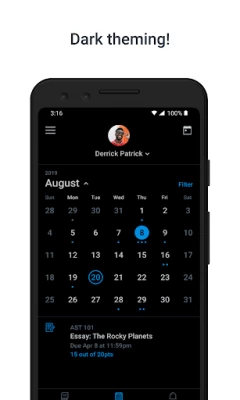
More About Canvas Parent
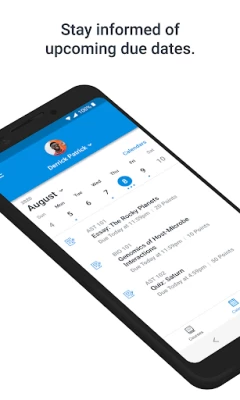
• Set reminders for assignments
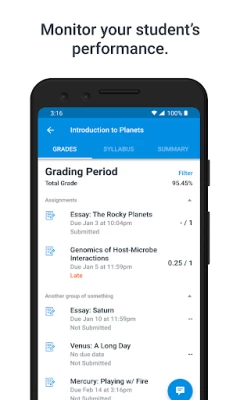
• View assignment grades
• View course grades
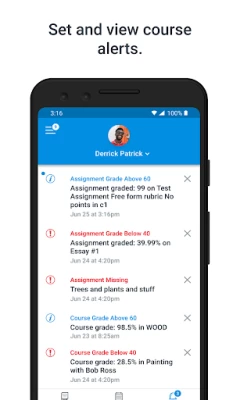
• Set grade alerts
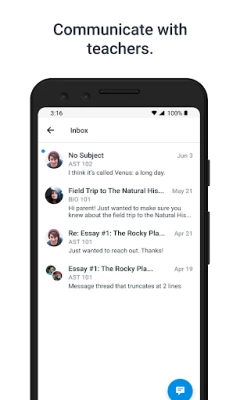
• View course announcements
Important: This mobile app is only usable by parents whose children attend schools that have enabled Canvas Parent.
Latest Version
3.12.0
October 25, 2024
Instructure
Education
Android
797,230
Free
com.instructure.parentapp
Report a Problem
User Reviews

Erin Soos
5 years ago
When it worked, it was pretty cool. The problem is, upon opening now, I only get a black screen for a week plus now. I've uninstalled and reinstalled with no luck. I've Googled the issue and the only way to get help is THROUGH THE CANVAS APP which just gives a black screen so how the hell am I supposed to do that??? Very frustrated.

Jessica
1 year ago
Good app. I wish you could filter the available tabs on the mobile app to only view missing assignments. It would be nice if the assignments could be set in chronological order by due date for easier review. It doesn't appear all teachers use the program in the same manner so it makes it more challenging for users to figure out certain things (like assignment due dates).

Steve Davidson
3 years ago
Support is non-responsive. In the App, one can't add Courses to an empty Calendar because "Can't add more than 10 Courses", even though only one Course is selected. However, the SAME courses are added and visible on the Desktop login. Alert content is frequently not accessible. Very buggy app. Update 08/19/2022 - This is still the case. Support tickets on this topic have yet to be responded to, if they're still even open.

A Google user
7 years ago
This application perhaps has everything you need to discover what's going on with your student, however if it does, it's buried deep deep deep in layers on layers of screens and it cannot readily be found. A top-end dashboard style would be far more useful. I would have abandoned in this app except then I would have no other access to my student's status.

Mandy McCauslin
5 years ago
What happened!! I used to easily navigate the app and now it is terrible!! With one click I could see what each child had going on for the day, zoom meetings and if assignments were submitted or not. It was easy to read for us newbies trying to navigate homeschooling. I HATE the new update!! What genius decided to update and completely change it just as most parents in the United States needs to use it? Change it back please!!!!!

TK Stacy
1 year ago
Zero stars. Based on a "Microsoft" account the parent "should" have registered in whatever system. Cannot login using whatever Microsoft bologna they have to obstruct logging in. It asks for a code sent to your email, you check your email, return to the screen and it blanks out and goes back to login. Then you repeat 5 times on loop, and is still no where logged in and unable to review the information.

Kimmi Gordon
5 years ago
I don't like that assignments can be locked if they are due in a couple days. this makes it hard to stay on top of everything. I cant print things off ahead of time, so I find myself turning on my extremely slow computer almost daily just to print out 1 or 2 papers. it would be nice to print everything off at the beginning of the week, all at one time and would make it a lot easier to stay organized!! would also save me 20 minutes a day waiting for everything to load!!

Jackie Lendvay
2 years ago
Currently unable to see courses and grades for a week now. Tried to contact customer support and the app will not allow the message to send to customer support. I logged out and back in again and can view everything except courses and grades. I tried again to contact customer support but the app won't send it and I cannot find a phone number anywhere.

Tirtha Roy
2 years ago
This app is required by the school district to help us keep an eye on our child's grades through the semester. The app itself is okay at best, with a vanilla interface that needs some work to provide better separation between elements. But the main reason for two stars is that the end goal is to understand how our child did for the semester. However the app automatically rolls over to the next semester before final grades are in, and there is no way to navigate back to see their final grade.

Shawn Goertzen
5 years ago
Trying to sign up and I can't type into the password field. Makes it impossible to create an account. Update: got in but leaving the score at over star. App is very hard to use, no clear way to see assignments due today and the calendar has no consistency on what it shows. It is like they don't even try to think about the end user. Really poorly thought out.

M Dietzman
3 years ago
The app is not user-friendly or very informative. Once your settings are set in the beginning set up they cannot be changed. I had to uninstall and start over. I only left the weekly update, which comes at 3 am. Based on information from canvas this can be changed by going to your account notification. Which doesn't exist within the app. Do not recommend. Wish or school would go back to tyler sis.

Po Sobush
2 years ago
This app hasn't worked in days. There is just a panda on the screen that says uh oh, contact support if this keeps happening. I have submitted 2 tickets now to get it fixed and nothing has been done. I have checked for updates. Uninstalled and reinstalled the app. It doesn't work. Can't keep up with kids grades if you can't get past the screen that says uh oh. Extremely frustrated.

Dawn Tauro-Miller
5 years ago
I get too many notifications, sometimes more than 10 emails in one day, and they take too long to check, so I end up just ignoring and deleting them, which is not helpful or useful in any way, and is a big waste of time. There is no way to limit notifications without shutting them off altogether. It would be much better to be able to set some parameters for notifications, like perhaps, get notified only of missing work or if a grade is below a certain level/percentage.

Amanda Sumner
5 years ago
The email notifications are useless. You can tap on the link that is supposed to take you to a particular assignment, and it will just take you to the last page you had open. In my case, that could be one of my other two kids. I have to click to the right kid, then the subject, then scroll through, trying to remember the name of the assignment that was just graded. Also, I wish there were links to the teachers' home page to quickly check the weekly list of lessons, etc.

Peggy Crofut
5 years ago
The calendar view is amazing! I needed a way to see what has been turned in and is missing in real time. Sadly, "missing" is green. Can't it be red or highlighted somehow? Also, if something is successfully submitted, there should be a green checkmark next to it so I don't have to click on each assignment to see if it's been submitted? Make the main view more helpful and you'll get 5 stars.

Jonathan Ross
2 years ago
I get 30 to 50 emails per day. The notification settings in the app affect only the app itself and not email notifications, for that I need to login on a computer but my login credentials only work on the app and never on any other device. When I try to reset my password, it shows that an email has been sent, but nothing ever comes, not even to a spam folder. Zero customer support. Zero answers. Dear God make the horror stop!

Stephanie Leon
5 years ago
Seems I've had the opposite problem of most of the reviews here. It kept telling me my code was invalid when trying to sign up on the desktop version of the website, but when using the mobile app, I WAS able to sign up using the same code the website said was invalid! The only issue I encountered was: not to click/tap out of the code field, or switch apps (to see the code in a picture or text, for example) because that makes the code field un-editable.
A Google user
5 years ago
The app has a lot of potential. I would like it if it didn't take so long to load and then switch between kids. I also would like the text feature to include something that indicates which student the notification is for. I have 3 kids, and a text that says "Subject: Canvas Alert New announcement: Look in Files" is lacking in helpful information.

Adam Mayer (Armywarpig)
1 year ago
So far, I really like the app. I'm pleased with the way I'm able to keep tabs on my kids' progress in school. However, I would like to see some changes in the notification. Meaning. I have two children that are in the same grade, and have some of the same teachers, when notifications of assignment competition, missing, or late I would like to see who ot is i.e. X student has completed X assignment l.

Jason Meyer
1 year ago
Garbage. Zero notifications ever received. All settings are set to have notification on. Even uninstalled and reinstalled, also removed student and re-paired with student and nothing. Assignments with a grade show as not submitted. Grades/scores are inconsistent and don't make sense. Student calendar does not load, only says "there was an error loading your student's calendar." The alerts tab says "an unexpected error occured." This is the only way I can see my child's grades, and I can't.









