
CA DMV Wallet
July 23, 2024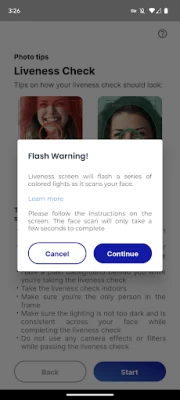
More About CA DMV Wallet
California DMV Wallet gives you the control of the driver’s license data you share with others. For example, when buying age-restricted items, the app can confirm you are of legal age without having to share your birth date or address.
With mDL in your CA DMV Wallet, you can breeze through the TSA queue at the airports using your phone. You can also enroll in the TruAge program via the Wallet Marketplace to purchase age-verified products at a corner store near you (starting with select pilot locations in California and expanding nationally). The Wallet will soon be supporting online identity verification for government and commercial applications.
Designed with California's diverse population in mind, the CA DMV Wallet open-source platform uses state-of-the-art encryption algorithms and security technologies to combat fraud and reduce identity theft while improving privacy, transparency, and access for all Californians with a smartphone.
Important note: While the mDL can be used as an official state-issued ID, per the pilot scope approved by the California legislature, you must still have a physical driver’s license or identification card with you.
For more information, please visit: https://www.dmv.ca.gov/portal/ca-dmv-wallet/
California DMV Wallet is free, easy, secure, and convenient
Latest Version
0.2.11
July 23, 2024
California Department of Motor Vehicles
Travel & Local
Android
165,943
Free
gov.ca.dmv.wallet
Report a Problem
User Reviews

Dave Smith
1 year ago
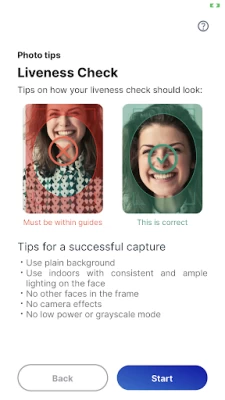
The screen before verifying ones identity via facial image and liveness test doesn't scale to my screen size, so the "next" button is not visible. Workaround is to receive font size to minimum but it's dismaying that a big this obvious made it into the app and has apparently persisted for several months.

Chris H
1 year ago
App keeps freezing right after I unlock it using biometrics (thumb print), and when I do get through, any action I try to execute/click through leads to a blank frozen screen. I had high hopes for this app to mitigate carrying my ID and/or DMV services. Hope they fix/update soon. For reference, I have a Samsung Galaxy 22.

Bry Herogo
1 year ago
Great app used it in trial and have kept it since I can see it going mainline and getting rid of hard card licenses. Worked with TSA in some parts of United States others didn't allow it yet or haven't heard of it and weren't comfortable yet . Needs to block access to entire phone so privacy isn't violated by police officer or law enforcement when showing divital license they don't access entire phone. Forgot wallet one time ever had phone CHP accepted it even remarked liked it

Mario Chaves
1 year ago
There was a small glitch with getting the confirmation code sent to the phone in order to proceed. The app would freeze after that, but I set up Messages to go to my iPad and then I could proceed. The rest of the process was quick and easy.

Danny Ng
1 year ago
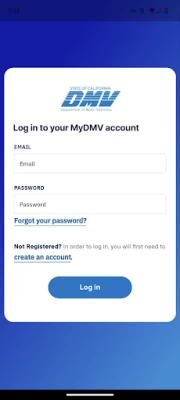
After logging in and verifying my phone number, I'm presented with a page that says system unavailable Update 1/12/24: During the login screen, everytime you go to another app (e.g. password manager) it auto locks the app, which means you're unable to fill it out. DMV should just kill this project and let Google/Apple take over their incompetence.

Alex F
2 years ago
Installed on Samsung S23+, standard Android 13. Login using dmv credentials and validate via text. All good, next step is to take license picture and the app is stuck on instructions, no way to proceed. Tried uninstalling and re-installing , same issue. Read other reviews and saw recommendation to change screen zoom. That did not help but reducing font size did the trick, buttons appeared at the bottom and I was able to proceed. That is very clunky, not adjusting to font size.

Warren Schrader
2 years ago
Finally!!!! California is finally going digital! The sign up and verification was easy in my case. Just scan both sides of physical ID and take a selfie. A warning about the selfie: it'll make your phone screen rapidly flash a bunch of different bright colors. Might be an issue if you're prone to seizures. As of the time of this review, you can only use it at a handful of convenience stores around Sacramento and for the TSA PreCheck line at select airports around the country.

Stephen Treger
2 years ago
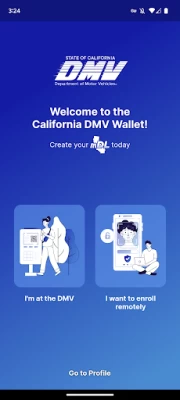
App won't run. Emailed support address and haven't heard back. Installed on older GS9+. App launches and is in endless loop with the second screenshot from left and a popup demanding Authentication Required to use the DMV Wallet. Authenticate (Face, pin, biometric) and cycles right back to demanding authentication again. Edit: saw many with the PIN auth loop. Played around to try and hit the DL Status link at bottom of screen and eventually got past. Easier winning prizes at a County Fair!

Kyle H
1 year ago
App constantly wants to re verify biometrics, even if you go to another app to check something and return immediately. Also will not process the TruAge verification. Stuck in a loop or gives an error. Tried on multiple devices, my phone (Galaxy S20) and my Tablet (ONN device, still android). Very disappointed in our state government pushing out an app that is essentially useless.

Richard
2 years ago
Extremely convenient instead of having to carry around a physical license that could get lost or stolen. The app is a tad bit clunky (the brothers gets turned all the way up, like a flashlight and does not dim until you close the app so it's not very use friendly in dimly lit places or for people with light sensitivity). Otherwise, setup was a breeze and only took about 2 mins to complete. Just take a photo of your license, take a selfie, then you're done!

David B. (mtux96)
2 years ago
It works, I guess. It's horribly designed. There's problems if you have your font size too large. It's bad app design. Users should not have to change their font size to get it to work right and have to find the answer to that in the app reviews. That needs to be fixed and should have been found if properly tested. Not everyone has their font set to the lowest setting.

Sergio Torosyan
2 years ago
The worst and useless, trashy app I even installed. And it is really unbelievable where our tax money are going. Those lousy developers don't even test their app before putting in the market. Absolutely nothing is working. Starting from the home page, the texts are showing on each other, nothing is possible to select. Even after somehow you are able to select something, it is not possible to add the license. Basically this is a useless trash I added into my phone.

Christian Huebner
2 years ago
Terrible UI. Almost impossible to use with password manager die to the fact that every time you switch to another app the app requires unlock and usually just hags with a blue screen after that. Easily the worst app on my phone. Plus the mobiles drivers license can not be accessed without unlocking the phone, allowing the viewer to search the phone.

Nicholas Abad
1 year ago
Was working fine and seemed good initially, but now that it's been past 30 days it needs " to be refreshed " and upon clicking that it just stays stuck there. Doesn't matter how many times you close or force close the app. Also, it's been almost 2 weeks like this. Ok start, but pointless/useless at this point. I hope they fix the kinks sooner than later

m
2 years ago
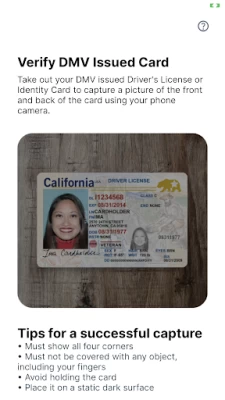
Digital driver's license is a great idea. I would have loved to have participated but the app is broken. I have a Google pixel 7 with the latest release of Android. When I load the app and get to the third screen which is tips for a successful capture it has a few bullet points. But it cuts off at the bottom of "card by adjusting the". There is no way to scroll down and I am stuck on that screen. Looks like whoever developed this app didn't do such a hot job at testing.

Phillip Trujillo
1 year ago
Worked fine in Beta, now just permanently stuck on "refresh." "Processing your data... This will only take a brief moment" lasts forever. It txt a verification code, but unlike 90% of apps, this on doesn't automaticly come up in the Samsung keyboard paste, so I have to switch between DMV and Msg app to read the 6 digit key, and it requires an unlock every time the app switches or the notification pull down is used. Should have just stayed Beta, it worked.

Chris Donovan
1 year ago
Annoying that you need to manually refresh every few weeks; that's something that should occur automatically in the background. This isn't the type of app you open every day (at least right now)... what happens when you actually need to use it and you're in an area with no coverage. Separately, it would be even better if we didn't need to install an extra app at all. Google Wallet and Apple both support mobile licenses - CA should work towards integrating with them.

L L
1 year ago
What a terrible app! Every now and then, the app would ask me to refresh, even if I use my biometrics to log in. It is more frustrating if you forgot your password; the app asks for your email address and sends you a code, but if you go to your email to retrieve the code, the DMV app refreshes itself to the login screen, which you can't login because you forgot your password. This cycle would continue unless you can check your email with another device.

GinaMarie
1 year ago
Actually works. The state is catching up with the private sector a bit. 💪 For reviewers saying that it freezes, hit the back button and you're good. Be sure to use an email address you have access to and be ready to have your photo taken (though it won't put your photo on the app) it uses it for verification. Creating account opens browser and shuts you out of the app so log back in to finish. Annoying but shouldn't disrupt the savvy. Video tutorial would help folks.

Joseph Cascio
1 year ago
Devs should be embarrassed by this abomination of an app. Autofill and password managers do not work. The app locks every time you leave it, even if just for a second. The virtual ID expires every 30 days and when expired, requires you to go through all the steps again to set it up. Which defeats many of the purposes of having the mobile ID. It's so bad, it's just not worth using.









