
Battery Widget Plus
December 17, 2025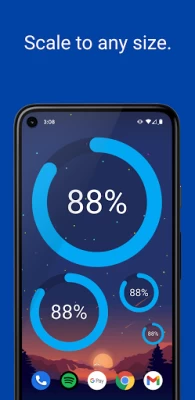
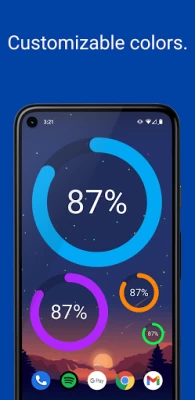
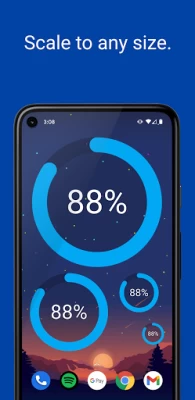
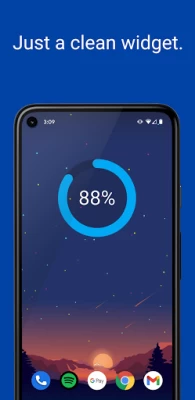
More About Battery Widget Plus
Latest Version
1.2.1
December 17, 2025
Willow Bee Software
Tools
Android
425,136
Free
com.ctrmksw.battery
Report a Problem
User Reviews

Stephen Behler
1 year ago
I like the app, if not for it disappearing all the time. And then my personal settings are wiped out when I bring it back. Update the app and I might give a better rating. I've since deleted it.

Dmitriy L
1 year ago
It works perfectly on my Galaxy tablet but continues to disappear from the screen of my Galaxy phone. The reason remains unknown. Sadly, I can not recommend it for a phone.

PD M
3 years ago
Tells % and can choose colors but not for lettering. I need mine dark to read on light screen or change background color to read light letters. If you can fix, it is a keeper.

Dto Timothy
9 months ago
It may not be the best app but it works excellent for me just what I needed, and the add arrangement is the best I have seen of all app, it only appear when you want to change something on the settings.

Kaira hihi (Asia D'Avanzo Montesano)
1 year ago
I see that others are saying it's very customizable, but for me the app wouldn't get out of the "Add widget to home" screen even when adding it like 3 times, so I was never able to actually customize anything or access any settings

P Lai
3 years ago
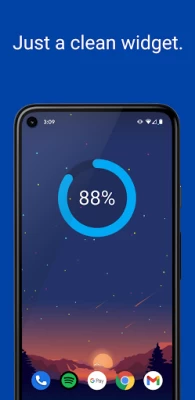
The only thing that I need to watch constantly is the battery level, and this app does exactly that with a simple and elegant widget that's easier to read than the default battery bar. It does exactly one job and it does it well.

Mike M
5 months ago
Just installed it. I can deal with this. Like many others, I can't deal with the new battery indicator (or Samsung battery widgets) post update. We'll see.

B Social
4 months ago
this is working fine. the only thing is missing that when we click on the widget takes you the app, which I want to disable it because of accidental touch.

Glynn Harrold
2 months ago
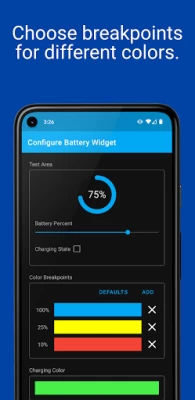
seems to work fine, but I was really looking for a way to have the break points for the colour while changing as well. can this be added?

Leranei Reynolds
10 months ago
I do like how simple it is. The best for me is the i can see the percentage without having to put on my reading glasses and squint. I would have given 5 star if we could select other devises for the widget.... s-spen, watch, buds etc.

Gregory Eaton
4 years ago
This is a nice simple battery widget with enough customization options to match it to my phone's theme perfectly. Includes color customizations for charge amount is a nice touch. This is perfect for displaying charge info without any of the extraneous BS functionality of so many other apps. Great work with this app! Make more of these!!

John C
3 weeks ago
Nice UI, Easy to use overall. Can customize resize widget easily. Much easier to see than tiny upper right status bar battery. Accurate works correctly. Recommend.

Nick Scheimann
4 years ago
A great, simple widget for your homescreen! I would love to have a way to select more exact colors, rather than just choosing off of the color wheel by touch, but that's really my only complaint with it! great widget!

C B
3 years ago
I downloaded a bunch of different battery widget apps, this was definitely the best of the lot and the one that stayed on my phone. The design is clean, the numbers are clear and easy to read, and you can customize the colors and size of the widget. It's nice looking, simple, and does what it's supposed to do.

Bart Cook
5 months ago
Seems to do what I wanted - I was able to add to the AOD screen on Galaxy S24+ using the Lockstar module of the Goodlock app with Android 15 and 1UI7. After I had added it, it didn't show until I restarted my phone, but now it does, so very happy.

Mihai Valentin
3 years ago
I installed it, then uninstalled it. For me, it's too small (1×1). I'd have liked a 2x2. I found Circle Battery Widget (free and donation) and I installed the latter. Simple, yet elegant and functional. Both are quite similar, but size matters in this case IMO.

Edward Hauff
3 years ago
Excellent app, exactly what I was looking for. Very customizable and easy to set-up. The only thing I would like to see and it's not just this app but all apps that offer a 1 x 1 widget. I would like to have the option to display the icon in the widget in the top portion, the middle or the bottom portion of the widget space.

Susan E
3 months ago
It was working really perfect cuz that's hard for me to see the percentage on my phone on Samsung it's tiny at the top but just recently it's having excessive batteries it which is kind of ironic for a battery app and then also it's not being accurate like my phone will say it's 53% but it'll say 52 etc please check and see if something's wrong with it

TAFFY H.
4 months ago
I've had this installed for a while and it's been crashing a lot lately (yes, I am constantly clearing the cache), so I put it in deep sleep, and my memory went up big time, plus my phone was very warm to the touch. Now it's cool again. Think I am uninstalling.

xman
1 year ago
It looks nice, it looks promising. Simple and useful. But it doesn't work. The widget always disappear and the battery usage goes back to restricted no matter what I set it. Numerous times I deactivated the battery optimization yet it is back to restricted. There is no way to make it work. And I liked it. Update. It worked for some time but since the last Android update same thing. I add it to Never sleep apps list and it doesn't stay there. I quit.









