

Assistant for Android
December 13, 2025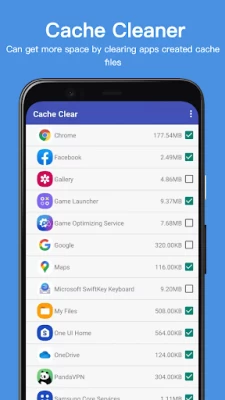
More About Assistant for Android
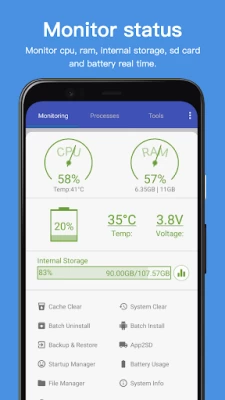
1. Monitor status (CPU, RAM, ROM, SD card, Battery)Monitor cpu, ram, internal storage, sd card and battery real time.
2. Process Manager
3. Clear Cache.
4. System Clean(Cache, Thumbnail Cache, Temporary File, Log File, Empty Folder, Empty File, Browser History, Clipboard, Market History, Gmail History, Google Earth History, Google Map History)
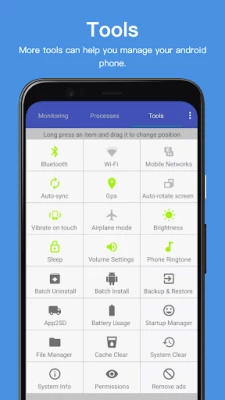
5. Power Saver(Bluetooth, Wifi, Gps, Auto-sync, Auto-rotate screen, Haptic feedback, Screen brightness, Timeout)
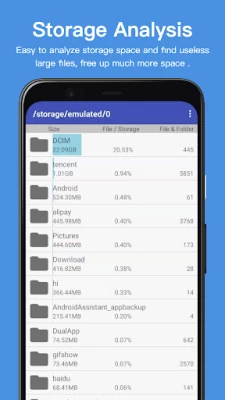
6. File Manager
7. Startup Manager
8. Batch Uninstall
9. Battery Usage
10. Volume Control
11. Phone Ringtone
12. Startup Time
13. Startup Silent(Menu->Settings->Startup Silent)
14. System Info
15. Widget(Quick Booster[1,4], Shortcuts[4])
16. App 2 SD: Get more free internal phone storage space
17. Batch Install
18. App backup and restore
This app uses accessibility service to kill process, clear cache.
Latest Version
24.44
December 13, 2025
AA Mobile
IT Tools
Android
32,628,093
Free
com.advancedprocessmanager
Report a Problem
User Reviews

L M
4 years ago
Be warned, after using the free version, when/if you buy the ad free version, YOUR SETTINGS DO NOT TRANSFER OVER from the free version TO the paid version. And, under Startup Manager, the check boxes are too close to the scroll line. When selecting an app to disable from startup, the screen suddenly jumps down the list. Finally, how about a feedback method instead of listing the mistakes with this app's development on Google Play? Who does that?

bebo10 Only
4 years ago
Excellent application with a lot of features. It works fine on Galaxy A21s. It doesn't look as fancy as the other applications but it does what's needed and as advertised. I must update my review of this application to point out that after the last application update it doesn't work as before when it comes to terminating the applications that I have chosen to terminate, and that's not good cause it used to before, that pointed out, I'm waiting for the next update that fixes that issue.

A Google user
5 years ago
Very handy app! Quick Boost restores performance to my older phone when it gets bogged down. QB animations are annoying, though. Should just kill the apps without having to play a 2-second "blow up" animation for each process. Also kind of annoying is that the pro version is a separate version of the app, and doesn't just unlock the free version.

Alexander
6 months ago
It's been in my top three "Utility Aps" group since 2014. It's pretty straightforward and to-the-point, easy and effective. Occasionally has an issue with the Accessibility permission but overall I find it quite useful. >REVISED: Everything here has been going downhill consistently for a long time now. My analysis concludes that this app doesn't feel right. Things have become... sus

Krystoffer Sprague
1 year ago
This has been my goto app for making apps close since my Epic 4G back on android 2.1. I've since had multiple droids and I've noticed that when using App2SD feature that the size of apps is INCORRECTLY displayed. I.e. Bing was shown as 23MB or so and was actually 74MB which is way off. Also I've noticed apps not listed, when I used them mere moments ago. YT isn't ignored yet it RARELY shows up, 1weather is another. Unless disabled they should be shown when used. 9.11.24 Update?! 😲 🤔 Let's see.

gD - Lacey Stinson
3 years ago
Excellent app for killing programs that keep running in the background after using them, without requiring root privileges. Even with plenty of memory (12GB), some apps won't load completely or respond properly if too many unnecessary background processes are running. This solves that problem quickly.

Gypsy Moon
3 years ago
I've been using this app for a very long time (5-ish yrs?) & I'll always use it as long as I'm using an Android phone. It has every tool you'd ever need - from basic system settings, to more advanced/usually hidden developer options + real time monitoring & control of all processes! Along w/ all of these already excellent features, you can look up ALL of your device details at the touch of a finger! + it comes with a built in file manager & enables you to easily backup/restore/move content.
A Google user
5 years ago
The only app I was able to find that would actually kill apps where they wouldn't just immediately relaunch. Also doesn't lie about what is running and all that nonsense you get with most of these bloatware apps that claim to speed up your device. Still a bit of a hassle to go in and manually kill Google and it's features constantly, though. Those do seem to relaunch on their own, and can't be selected as auto kill/quick boost apps.
A Google user
6 years ago
I downloaded it for it's Startup Manager to kill all the worthless apps that feel the need to autostart and max out my phone's memory. At killing them, it seems to worked ok, but the app itself is a little spamy. It has a lot of weird buttons and links that look like they launch functions, but actually launch advertisements. For example, there's a "Santa Clause" shaped button that when clicked, launches an ad for Uber. Really fricking annoying an unprofessional. The app also needs a ton of permissions that it probably doesn't need (like access to my camera?!), and which the author is probably using to harvest your data. Beware.

Edward Dolan
4 years ago
Edit 2: Freezes and no longer auto-kills apps, uninstall. Edit: Does not kill all apps. Have to install a second app killer for the apps this one doesn't close. Also, uses 18% CPU. Review: Provides an amazing amount of info and kills system processes for free, unlike other apps! Has a very nice UI, also. Will rate 5 stars if it gets updated in the next few weeks. Otherwise, will rate 2 stars and change review if it does not.

S
3 years ago
This is keeps randomly disabling itself everyday. Everytime I want to use it, I have to go back to settings, turn the app options off , then back on again. I've checked everything on my phone that could potentially cause it , but there is nothing. The permissions are on, accessibilty options on, battery not optimized, background, etc It actually just disable again, as I'm writing this, after I just turned it back no more than 5 mins ago.

David Fewless
1 month ago
Android Assistant needs a major overhaul because isn't working very well with the latest Android operating systems these days on Samsung Galaxy S22. The cashe and the RAM booster only seem to work sometimes, and that's if I reset or reinstall the app. And, as of late, since I installed Android 16, none of these tricks appear to be working.

Joseph Younger
4 months ago
I have used this app since late 2012 and have always appreciated its utility. Other than a few minor bugs which were quickly resolved, it's worth EVERY STAR

V M
3 months ago
After updating to the latest version, the background process termination function stopped working as it did before. Now only one background process is stopped, while the others in the list remain untouched. OxygenOS version 15

Perow Gourlay
1 week ago
This is an excellent app to help clean up your phone system. I only give 2 stars, because after use there's an on-screen ad using up a bit of the space this app made.

Liz Boyle
3 months ago
Best cleaning Management app I found on the market! However it now has ads?!? I remember paying for it to not have ads. I know there's another version that's free that doesn't do as much but I do remember paying for this one that's now free with ads...

Consumer Reporting Business
2 weeks ago
Android assistant version 24.43 - ads stall the app: The app stalls when loading the advertusements. It seems to be giving advertisments priority over functuonality this should not be so. Such heavy lagg and stalling suggest some intense operations going on. Advertisements do not need enough resources to cause the app to stall. I will highly suspect some sort of trojan horse remote controlling or spyware is attached to the advertisements features of this app.

John Shawler
2 weeks ago
Installed after doing a factory reset, and now I have ads. I didn't have ads before as I had the paid version. No response from the developer regarding the ads.

Gene Nash
8 months ago
I've used this since Android 2. Through no fault of theirs, it's not as useful as it once was because of system changes. I still use it daily, but docked a star for the loss of functionality anyway. My main use is stopping apps, but it seems more and more apps are not detected, necessitating manual stoppage. Frustrating. EDIT to remove 2 more stars and say: It no longer recognizes half the open apps. I'm now using 2 apps just to close apps. Ugh! Time to say goodbye.

Cyber Space Cache
1 year ago
I paid for this app more than once over the years, and again, the pro version is no longer in the Google Play Store. Again, with the annoying ads! Please give your paid customers a way to remove the ads! I've been using this app for many years since its very first launch. Very little has changed, but this app has stood the test of time and works well to this day.









