

HEX Editor
December 07, 2025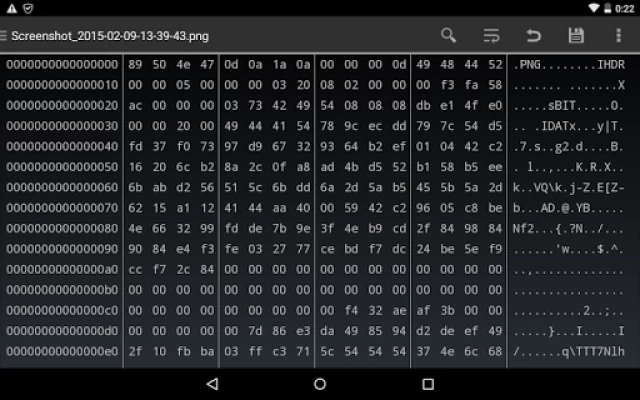
More About HEX Editor
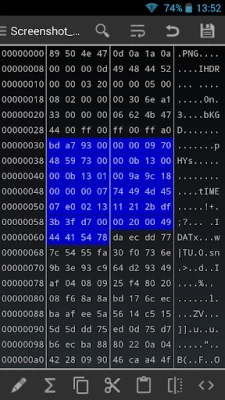
• Ability to work in multiple files
• Built-in terminal emulator
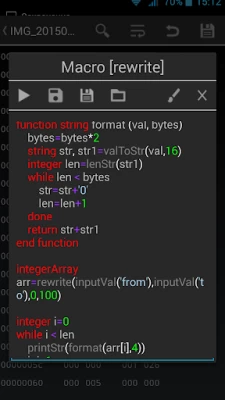
• Built-in macro system
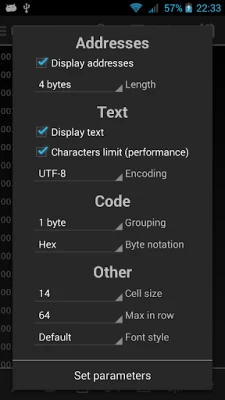
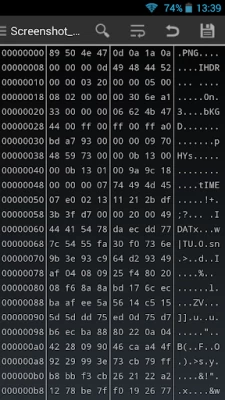
• Displaying data in hexadecimal/decimal/octal, the possibility to change the visible length of the address, as many other tweaks let you customize the viewing
• Supports of 8 encodings (ASCII, COI8-R, COI8-U, UTF-8, windows-1251, UTF-16, UTF-16LE, UTF-16BE). It's possible to view, search, edit the string in these encodings
• Ability to create own actions and link them with macro
• The Help with a detailed description of the features
Latest Version
2.8.3
December 07, 2025
First Row
Tools
Android
4,460,909
Free
com.myprog.hexedit
Report a Problem
User Reviews

Nathan Cs
3 years ago
It doesn't work so do not get this app it is a waist of time. When you try to edit something or look at something it just says "read failed reader has been killed"

MangoSamurai
4 years ago
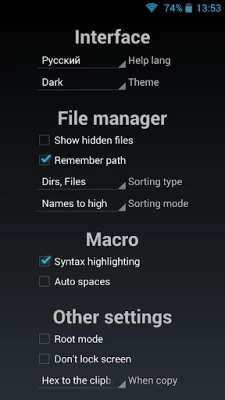
Please help me :( When I go to the settings and search for the root option I cant find it anywhere. I guess it should be at the other options button but there is only "dont lock screen" & "when copy...". I have a rooted oneplus 7t pro and it is running android 10. I hope you can contact me somehow and explain me why I cant see the root mode option

Caleb Holt
5 years ago
I dont know what to rate. I guess 3 stars. This is due to my ignorance. Whenever I open the app and click "Internal" it says permission denied. I cant access any game files. Can someone help me please. If we can solve this, I give 5 stars. I'm on Android btw.

A Google user
6 years ago
This app works, but it doesn't change permanently. Bc, when i restarted my phone, all off the settings on HEX editor was being reset, so i need to settings over and over again.

Duane Craps
2 years ago
I use. It to view old octal computer files. It works well for that wish that when you view data as octal it would list addresses in octal as well

Alan Squire
5 years ago
Works... but the ads, both on-screen and popup *when editing* make the experience frustrating. Also, can't search for string.

Aren Yashar
4 years ago
Does not allow editing of the file I managed to open, after a few false starts with it denying access despite having Storage privileges. Good for viewing a file, perhaps, but an editor this is not.
A Google user
6 years ago
Works well. Little bit tedious to enter data, but otherwise works fine. For all you complaining that the app can't open the storage, just select "External". Internal storage = root directory in this app.

Ryan Kastner
5 years ago
After opening three files it will only let you see the two side panes - offset and ASCII data - unless you upgrade. Completely worthless without raw hex code and as a result. If that's what the app developers want they should have only made a paid version and stopped wasting our time!

TheRoyalOne2021
4 years ago
Thething i don't like about the app is that every time you go on settings or almost any page then press back it goes off of the app,but what's stupid is that when you go back on the app it did go back,which means you have to constantly open the app everytime you want to go on the settings or if you click the wrong button,very annoying...also it's dumb that you can't click and edit bytes,you have to manually search them which is okay,but time consuming
A Google user
6 years ago
Any app from Internal mem can be Opened with Hex editor. But File manager in Hex editor cannot browse through Internal memory: "Open directory failed. Permission denied". It works only on rooted phones, if Root privilege granted to Hex editor. It's a problem on new phones coming with only Internal mem, without support for SD cards
A Google user
5 years ago
I can't really rate this for what I was trying to do, but I am sure it is a very useful tool in other areas. I am some what familiar how hex works because I have had used hex numbers on pc to edit a game file to change it's value. I have browsed this app for a short time and it seems to be able to do what it says.

panskarpta
3 years ago
So I used it for modding btl files which use hex. However finding a specific hex fragment, it returns a few results, but keeps cycling to only some of them, I found the fragment I was looking for by using another program and I did find it here using offset, yet still not appearing on search results. Another bjg disadvantage is that you have to go each time to the directory to open the file, I'm sorry but it's not worth it

Frank Wojtczak
4 years ago
According to the description, this app has in-app purchases. I assume that those purchases allow you to turn off any ads. Maybe not. How do you find these in-app purchases? This app is so bare bones, I can't really find much of anything. And the ads are freaking annoying as all get out.
A Google user
6 years ago
Despite giving permission to storage, in the app, the sdcard does not show up. I manually added the path. I could then see the files, but when I open any file I get a permissions error. Again, the app has storage & sdcard access per android's app settings.

Alyssa Basilio
5 years ago
Recently downloaded this one and tried hacking an app using it. Works well and I'm trying to find a new hex for the app I hacked since I want to learn a bit more about this app. When I used Hex editor on the app, it worked well, I can buy a lot of things in the game, and now I'm working on how I can make certain items unlimited or a least x99.
A Google user
6 years ago
Useful app but there're quite much problems. First, there are two paths by default, 'internal' and 'external' where internal means the root folder and external means phone storage, which doesn't make any sense since my phone is not rooted and cannot access the root folder. Second, even by manually adding SD card by pressing '+' button at the bottom, if I select any file in SD card, it says "Permission denied".
A Google user
6 years ago
Wow, super useful! Developer is very responsive. With his(her?) help I was able to build a script to perform a customized checksum to auto-majically verify data on EPROMs. Been using Hexedit to do it on my desk for years but now I can do it on my phone! It would be nice to not disable the swiping ability from the keyboard (GBoard in my case) as it's kind of painful to peck out the scripts. (I understand the spellchecker gets in the way of coding, but the user can easily switch to pecking any time.)

Paul McCloskey
5 years ago
It works for reading and writing hex files. Can search for hex fragments and strings. However, the ads are a bit much. After less than a minute, I got a video ad, blasting full volume. This is on top of the flashing banner ads already showing. Uninstalled and found an older version on an apk archive repository. Works just as well without that 1990s shady wareZ site feel.

Jack Hu
5 years ago
It's easy to use (if a bit dated), and does work well, but lacks any kind of power tools (jump to next dword, hex calculator, etc.). It's suitable for some basic hacking (provided you know which address you're looking for), but doing any kind of meaningful debug/reverse engineering work, then look elsewhere.









